- November 20, 2026

Merge Queue for AI Coding Agents: Lessons From 900 PRs
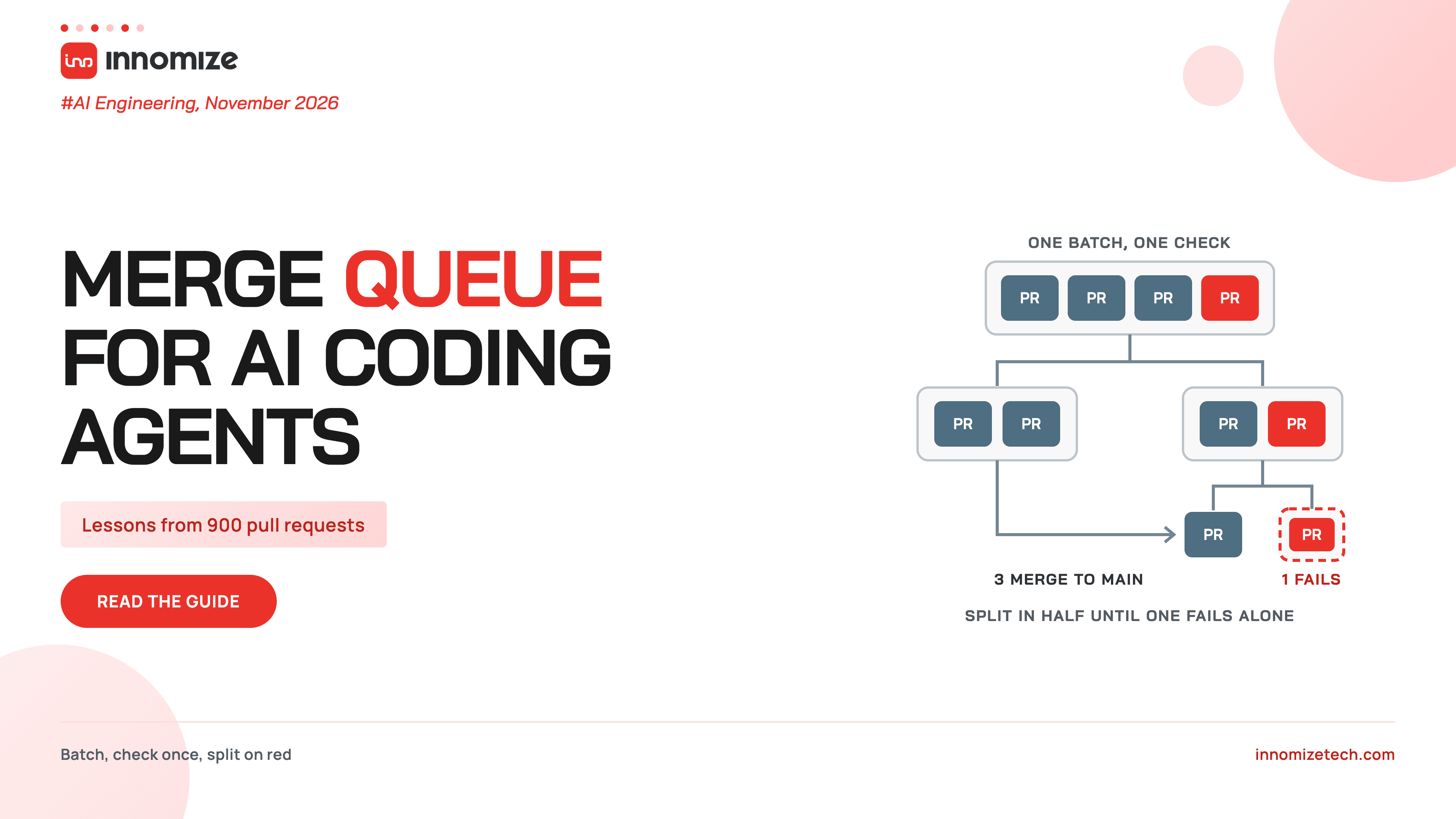
AI agents open pull requests faster than checks can run. How we built a merge queue with batching and bisect, what broke in 900 PRs, and the 9 rules we keep.
As you know WebSockets makes it possible to open a two-way interactive communication session between the user’s browser and a server. With this API, you can send messages to a server and receive event-driven responses without having to poll the server for a reply. But now we have another option to communicate between the backend and client applications by using the web Push Notification.
Browsers support:
Browsers do NOT support Web Push on iOS.
Generating the VAPID keys identifies who is sending the push notification. We can use the web-push npm module to generate VAPID keys. So let’s install and run the command web-push generate-vapid-keys to create the key.
#web-push generate-vapid-keys

=======================================

Public Key:
BPms6Rgidy60xE0NNO9Foiim3JZBIVIGY_bGKgdo6zo5qflngv4pYMHXAl4PqETSVJhRXbMxSe_3HgdTCUxoqz4

Private Key:
e-eQditkkIYVrAb7Es0dIt4b1niCh68YH0cLIPMtoQc

=======================================
We need to create the worker file and place it in the root directory. When the server sends a push message and then dispatched your service worker.
self.addEventListener('push', function(event) {
    // Received a push message
});
The above code will register a service-worker to listen to ‘push’ events that will receive the message when the server sends a push notification to the client.
For the Angular application to receive push messages, we have to activate the service worker. When the service worker is active and installed, it can subscribe to push notifications.
Refer to the below code in the angular app.component.ts file:
/**
* Register service worker and get the subscritiption
* @param {String} applicationServerPublicKey    The VAPID public key
* @return {String} The subscription string object that your server need this info to send to browser
*/
async registerServiceWorker(applicationServerPublicKey) {
    const applicationServerKey = this.urlB64ToUint8Array(applicationServerPublicKey);
    // Register service worker
    const sw = await navigator.serviceWorker.register(`/service-worker.js`, { scope: '/' });

    try {
        if (Notification.permission === 'denied') {
            return;
        }
        // Registering push
        let subscription = await sw.pushManager.getSubscription();
        let isSubscribed = !(subscription === null);

        if (!isSubscribed) {
            // Subcribe to push notification
            subscription = await sw.pushManager.subscribe({
                userVisibleOnly: true,
                applicationServerKey
            });
            isSubscribed = true;
        }
        // subscription incluces all the infomation that the nodejs application need to
        // send a push notfication: browser endpoint, encryption key needed for sending data
        return JSON.stringify(subscription.toJSON());
    } catch (err) {
        console.log('Failed to subscribe the user: ', err);
        return null;
    }
}
“The information subscription will need to be stored on the server side. This information is needed to know which client endpoint should have the correct sent from the backend service (NodeJS)”
The Client application is successfully set up to receive the push messages. So now let’s start to implement the service which will push messages from a backend service (NodeJS). We are using web-push to send the data and will encrypt the data required which is required for Web Push.
First, we need to set up the web-push service:
const webpush = require('web-push');

// VAPID keys should only be generated only once.
const vapidKeys = webpush.generateVAPIDKeys();

webpush.setVapidDetails(
  // Your email
  'mailto:example@example.com',
  // The VPID public key
  vapidKeys.publicKey,
  // The VPID private key
  vapidKeys.privateKey
);

// This is the same output of calling JSON.stringify on a PushSubscription
// This infor is the expected result of registerServiceWorker function.
const pushSubscription = {
  endpoint: '.....',
  keys: {
    auth: '.....',
    p256dh: '.....'
  }
};
We are ready to send the message from the backend service. It depends on your messaging situation when to determine the timing to send the message to the client (e.g. browser). You can use the below function to send the message:
/**
 * Push notification for current transaction
 * @param {Object} subscription The current subscription of a client
 * @param {Object} payload      The paylad data object you want to send to client
 */
sendPushNotification(subscription, payload) {
    if (subscription) {
        const pushSubscription = JSON.parse(subscription);

        WebPush.sendNotification(pushSubscription, JSON.stringify(payload), {}).then((response) => {
            sails.log.info(ResourceManager.getString('log_push_notification', 'successfully'), payload);
        }).catch((error) => {
            sails.log.error(ResourceManager.getString('log_push_notification', 'failed'), {
                error_message: error.message,
                error_details: util.inspect(error),
                type: Constants.LOG_TYPE.PushNotification
            });
        });
    }
}
That’s all you need to subscribe and listen for the messages from the server and also send the message from the server side.
But…
“A service worker is run in a worker context: it, therefore, has no DOM access and runs on a different thread to the main JavaScript that powers your app, so it is not blocking. It is designed to be fully async; as a consequence, APIs such as synchronous XHR and localStorage can’t be used inside a service worker.”
Updating the service-worker.js file as below
/**
 * Send message to client
 * @param {Object} client The current client to be sent
 * @param {Object} data The data to be sent to current web application
 * @return {Promise} The promise with thenable
 */
function messageToClient(client, data) {
    return new Promise(function (resolve, reject) {
        const channel = new MessageChannel();

        channel.port1.onmessage = function (event) {
            if (event.data.error) {
                reject(event.data.error);
            } else {
                resolve(event.data);
            }
        };

        client.postMessage(JSON.stringify(data), [channel.port2]);
    });
}

self.addEventListener('push', function (event) {
    if (event && event.data) {
        self.pushData = event.data.json();
        if (self.pushData) {
            self.clients.matchAll({ type: 'window' }).then(function (clientList) {
                if (clientList.length > 0) {
                    messageToClient(clientList[0], self.pushData);
                }
            });
        }
    }
});
Once the service worker receives a push message from the server side, it will broadcast the message to all registered clients (which client is registered is based on our service-worker.js file). You can see more details at https://developer.mozilla.org/en-US/docs/Web/API/MessageChannel.
Finally, we will update the Angular code to listen to the messages sent from the service worker.
Refer to the below code:
listenServiceWorkerMessages() {
    const serviceWorker: any = navigator.serviceWorker;
    let handler = (event) => {
        if (event.data) {
            // The data payload got from nodejs
        }
    };

    serviceWorker.addEventListener('message', handler);
}
Some documents you can refer to:

Phong Tran
Cloud Architect, Technical Lead