The main key point for all our projects is trying to automate all things, it helps to reduce errors (e.g. human mistakes), is fast and easy to deploy / rollback, and improves customer satisfaction.
We do have some approaches to automate the deployment process that we have been applying to our projects such as using Amazon Elastic BeanStalk or Amazon Elastic Container Service. However, in some cases, our customers don’t want to use those approaches because they don’t use AWS, they’ve already had the servers to run the app, and they want to keep their app on their On-Prime Data Center and have their IT guy to manage it. It led us to have to find out another approach to automate our delivery process. And we have chosen Ansible as the tool to implement our Continuous Delivery pipeline.
So I would like to write this article to share with you and outline our workflow and provide a brief introduction along with sample code to build this flow.
The Tools
- Jenkins: Jenkins is a self-contained, open-source automation server that can be used to automate all sorts of tasks related to building, testing, and delivering or deploying software.
- Ansible: Ansible is an open-source automation platform. Ansible can help you with configuration management, application deployment, and task automation. It can also do IT orchestration, where you have to run tasks in sequence and create a chain of events that must happen on several different servers or devices.
- Slack: a cloud-based set of proprietary team collaboration tools and services.
Why Ansible?
As you know, there are a lot of tools for infrastructure automation (infrastructure as code) such as Terraform, Chef, Ansible, Juju, and more. But there are a few reasons that make me select Ansible as below:
- It is very, very simple to set up and yet powerful.
- Ansible is a radically simple IT automation platform that makes your applications and systems easier to deploy. Avoid writing scripts or custom code to deploy and update your applications.
- Automate in a language that approaches plain English, using SSH, with no agents (like Puppet or Chef) to install on remote systems.
- Easy to integrate with our CI/CD pipeline using the Jenkins server.
The Steps
What we are going to build is the following deployment flow:
- Launch EC2 instance(s) (optional).
- Update OS and install needed dependencies such as install Node.js.
- Deploy the Node.js app to EC2 instance(s).
- Configure DNS (optional).
- Smock test.
Let’s code…
Project Structure
When doing any coding stuff, the project structure is one of the most important things I pay attention to. If you have experience in working with Ansible, you should know how to organize the Ansible project. I followed the alternative approach mentioned in this article, feel free to select your own approach.
My project contains the following root directories/files:
- scripts: it contains a shell setup script to install Ansible, and Ansible Galaxy, and generate a self-signed certificate to run our Node.js app in secure mode (HTTPS).
- cert: directory to keep a self-signed certificate.
- ansible: put all Ansible code into this directory including playbooks, roles, var files, etc.
- Jenkinsfile: the Jenkins pipeline code for CI/CD pipeline.
Role
In Ansible, the role is the primary mechanism for breaking a playbook into multiple files. This simplifies writing complex playbooks, and it makes them easier to reuse. The breaking of the playbook allows you to logically break the playbook into reusable components.
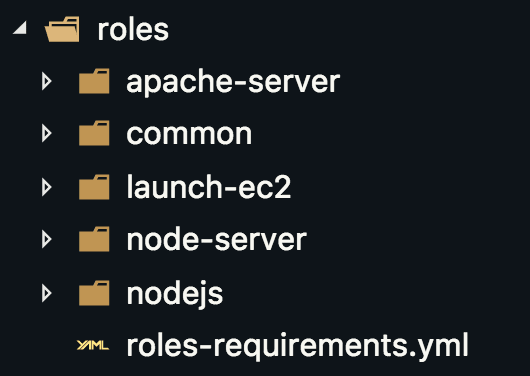
Ansible Roles
- apache-server: we don’t use this role on this project but I wanted to keep it here. This role will configure the Apache using our own httpd.conf template file. To install Apache, we can use geerlingguy.apache role.
- common: put all your comment stuff into this role such as updating your OS to ensure your server(s) are up to date.
- launch-ec2: this role to launch EC2 instance(s) to deploy our app.
- node-server: contains all needed steps to deploy and run the Node.js app
- nodejs: install the Node.js runtime.
Conclusion
Using Ansible, you can easy to provision and install software to run your application automatically, you can manage your infrastructure as code (IaC). However, running your software is not simple as this demo, you will need to do more things such as set up the network, configure the firewall, and auto-scaling. To do those things, you might need to combine them with other tools. For example, you can use the AWS CDK framework to provide your AWS infrastructure (network, database, EC2 instances, and auto-scaling), then use Ansible to provision your EC2 instances and configure your applications.
I hope this post will bring some ideas to you to design and deploy your application. If you have any issues or need help, just let me know by adding comments on this post.
Thank you for reading!