"Lambda is expensive at scale."
We've heard this from engineering teams for years. And for years, it was true. The math was simple: if your workload processed millions of requests monthly, containers won on cost. Lambda's per-invocation pricing added up fast.
AWS re:Invent 2025 changed that equation. Lambda Managed Instances now offers serverless developer experience with container-like economics. The old rule book needs an update. (We wrote a deep-dive analysis of Lambda's biggest update when AWS announced it. This article builds on that analysis with a practical decision framework.)
At INNOMIZE, we've been building cloud architectures for our projects across startups and enterprises. We've seen teams make this decision dozens of times. The framework we used for years no longer applies cleanly. Here's what we've learned since re:Invent.
The old decision tree
Before re:Invent 2025, most teams followed a straightforward pattern.
Sporadic, unpredictable traffic? Use Lambda. The pay-per-invocation model made sense. You paid nothing when idle.
Steady-state, high volume workloads? Use ECS or EKS. Container pricing was more predictable. At scale, you saved 30-50% compared to Lambda.
Complex orchestration needs? Add Step Functions. Long-running processes over 15 minutes? Containers were your only option.
This worked well. Teams could run quick math and pick the right service. The decision took 10 minutes.
What changed at re:Invent 2025
AWS introduced Lambda Managed Instances. This changes the serverless value proposition fundamentally.
The new capabilities
Lambda Managed Instances keeps your instances warm. No cold starts. This was Lambda's biggest weakness for production APIs, and AWS fixed it.
The pricing model shifted too. Managed Instances work with Savings Plans. Commit for 1 year and save 17%. Commit for 3 years and save up to 72% (EC2 Compute Saving Plan). This was previously a containers-only benefit.
Each instance now handles multiple concurrent requests. Before, one request meant one execution environment. Now a single instance serves many requests in parallel. This improves resource efficiency dramatically.
The cost comparison: an example
Let's walk through an example: 100 million API requests monthly. Here are the assumptions we're using:
Workload assumptions:
- Traffic pattern: ~38 requests/second average, ~80 req/sec peak (2x burst)
- Application: Single REST API service (monolithic or Lambdalith pattern)
- Request characteristics: 200ms average duration, 1GB memory allocation
- Response size: ~10KB average (affects data transfer costs)
Resource sizing rationale:
- Lambda: Each invocation uses 1GB memory. With Lambdalith pattern, a single function handles all API routes behind API Gateway
- ECS Fargate: 4 tasks sized at 1 vCPU + 2GB memory each. Each task handles ~20 req/sec for typical API workloads, providing ~80 req/sec total capacity with headroom for bursts
- EKS: 3 t4g.medium nodes (2 vCPU, 4GB each = 6 vCPU, 12GB total). Using Graviton2-based instances for ~20% better price/performance vs x86. Sized for single-service deployment with cluster overhead
Here's how the costs break down across compute options:
Lambda Standard (on-demand) - pricing reference
| Cost Component | Calculation | Monthly Cost |
|---|
| Request charges | 100M × $0.20/1M | $20 |
| Compute (GB-seconds) | 100M × 0.2s × 1GB × $0.0000166667 | ~$333 |
| Data transfer (outbound) | Varies by response size | ~$20-50 |
| CloudWatch logs/metrics | Log ingestion + storage | ~$15-25 |
| Total | | ~$390-430 |
Lambda Managed Instances (3-year Savings Plan)
| Cost Component | Calculation | Monthly Cost |
|---|
| Request charges | 100M × $0.20/1M | $20 |
| Compute (72% savings) | ~$333 × 0.28 | ~$93 |
| Managed instance base | Varies by concurrency | ~$30-50 |
| Data transfer (outbound) | Varies by response size | ~$20-50 |
| CloudWatch logs/metrics | Log ingestion + storage | ~$15-25 |
| Total | | ~$180-240 |
ECS Fargate (4 tasks, 1 vCPU, 2GB memory each for ~80 req/sec capacity) — pricing reference
| Cost Component | Calculation | Monthly Cost |
|---|
| vCPU hours | 4 × 1 vCPU × 730 hrs × $0.04048 | ~$118 |
| Memory hours | 4 × 2GB × 730 hrs × $0.004445 | ~$26 |
| Application Load Balancer | Base + LCU charges | ~$25-35 |
| Data transfer (outbound) | Varies by response size | ~$20-50 |
| ECR storage | Container images | ~$2 |
| CloudWatch logs/metrics | Monitoring | ~$10 |
| Total | | ~$200-240 |
EKS (3 t4g.medium nodes, self-managed) — pricing reference
With cost optimization applied:
| Compute Option | On-Demand | With Savings Plans/Spot |
|---|
| Lambda Standard | ~$390-430 | N/A |
| Lambda Managed | ~$220-290 | ~$180-240 (3-yr SP) |
| ECS Fargate | ~$200-240 | ~$140-180 (Spot + SP) |
| EKS (Graviton) | ~$215-255 | ~$135-175 (Spot + SP) |
The takeaway: With proper optimization, all options land in a similar range of $140-240/month. The cost gap that used to favor containers has largely disappeared.
Here's the thing: operational overhead matters too. Managing EKS clusters takes engineer time. That time has a cost. When we factor in team hours spent on container orchestration, Lambda Managed Instances often wins on total cost of ownership.
Operational simplicity has real value. Factor engineer time into your cost calculations, not just AWS bills.
The new decision framework
The old question was "serverless or containers?" The new question is "which compute model fits this specific workload?"
We've updated our framework to reflect the new options. Here's the decision tree we now use:
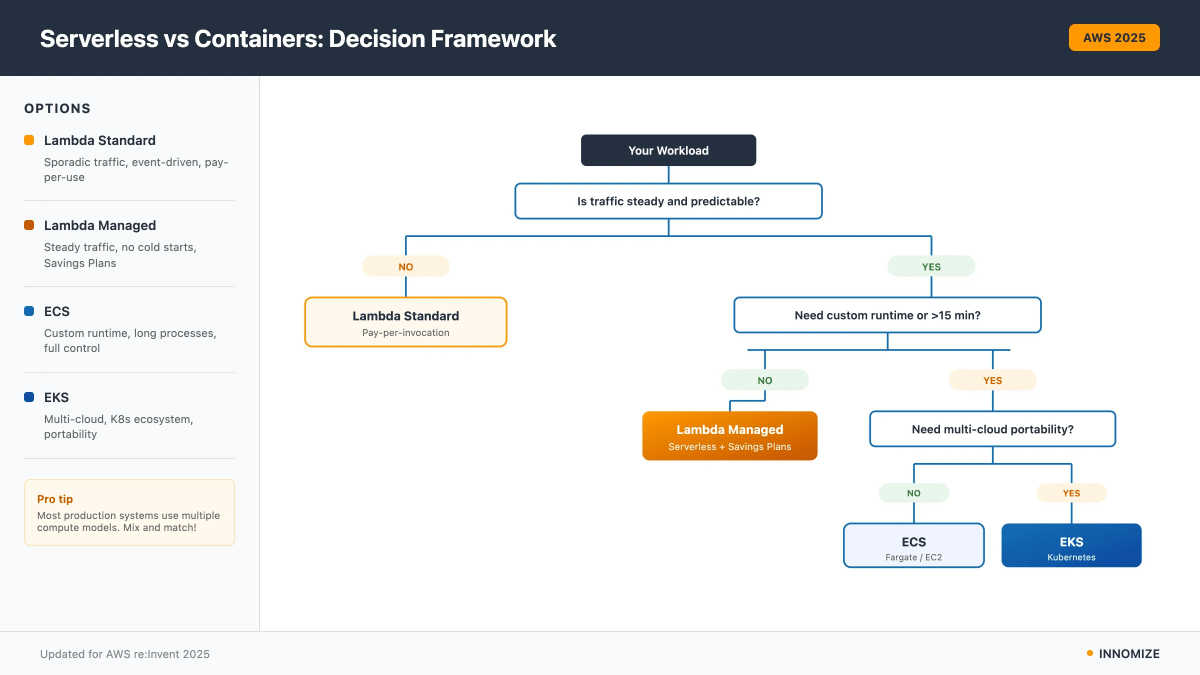
When to use Lambda Standard
Lambda Standard still makes sense for specific patterns. We recommend it when traffic is unpredictable with 10x+ swings between peak and trough. If you can't commit to long-term pricing because the project is early stage or uncertain, Standard pricing keeps you flexible.
Lambda Standard works well when cold starts don't hurt your use case. Async processing, batch jobs, and backend tasks tolerate latency spikes. Event-driven architectures built on SNS, SQS, S3 triggers, or EventBridge fit naturally here.
We see Lambda Standard deployed often for webhook receivers with variable load, image processing pipelines, scheduled data transformation jobs, and API endpoints with infrequent traffic.
The common thread: workloads where paying for idle capacity makes no sense.
When to use Lambda Managed Instances
Lambda Managed Instances shines for steady, predictable workloads. If your traffic patterns are consistent and you can forecast monthly request volume, Managed Instances offers better economics.
User-facing APIs benefit most. Cold starts hurt UX. Managed Instances eliminates that problem while keeping the serverless developer experience. Your team doesn't need to learn Kubernetes or manage container registries.
At scale, the Savings Plans commitment pays off. If you're processing tens of millions of requests and can commit to 1-3 year pricing, the savings add up. We've seen 40-50% reductions compared to Lambda Standard for the right workloads.
Production REST and GraphQL APIs work well here. So do real-time data processing streams, authentication services, and high-traffic microservices.
The common thread: predictable, latency-sensitive workloads where you want serverless simplicity.
When to use ECS
ECS remains the right choice when Lambda's constraints don't fit.
Runtime flexibility matters. If you need a specific language version, custom system libraries, or binaries that Lambda doesn't support, ECS gives you full control. Sidecar patterns for logging, proxies, or service mesh require multi-container architectures. ECS handles this natively.
Execution time matters too. Lambda caps at 15 minutes. Long-running processes need containers.
We recommend ECS for teams with existing container investments. If your organization already runs containers, has Docker expertise, and has built CI/CD pipelines around container workflows, ECS fits naturally. Switching to serverless means rebuilding that infrastructure.
Legacy application modernization often lands on ECS. Containerizing a monolith is straightforward. Refactoring it for Lambda is a larger project.
When to use EKS
EKS makes sense for specific organizational contexts.
Multi-cloud strategy is the clearest signal. If you need workload portability across AWS, Azure, and GCP, Kubernetes is the common denominator. EKS on AWS, AKS on Azure, GKE on GCP. Same tooling, same deployment patterns.
Teams invested in the Kubernetes ecosystem benefit from EKS. Helm charts, operators, service mesh, custom controllers. These tools are powerful. If your team knows them, EKS lets you use them.
Complex orchestration requirements sometimes need Kubernetes. Canary deployments, blue-green releases, sophisticated traffic splitting. EKS gives you fine-grained control.
Some enterprises have standardized on Kubernetes as their compute platform. If that's your organization, EKS is the natural fit on AWS.
We see EKS deployed by platform engineering teams building internal developer platforms, organizations with multi-cloud requirements, complex microservices architectures, and teams with deep Kubernetes expertise.
The common thread: organizational investment in Kubernetes as a platform.
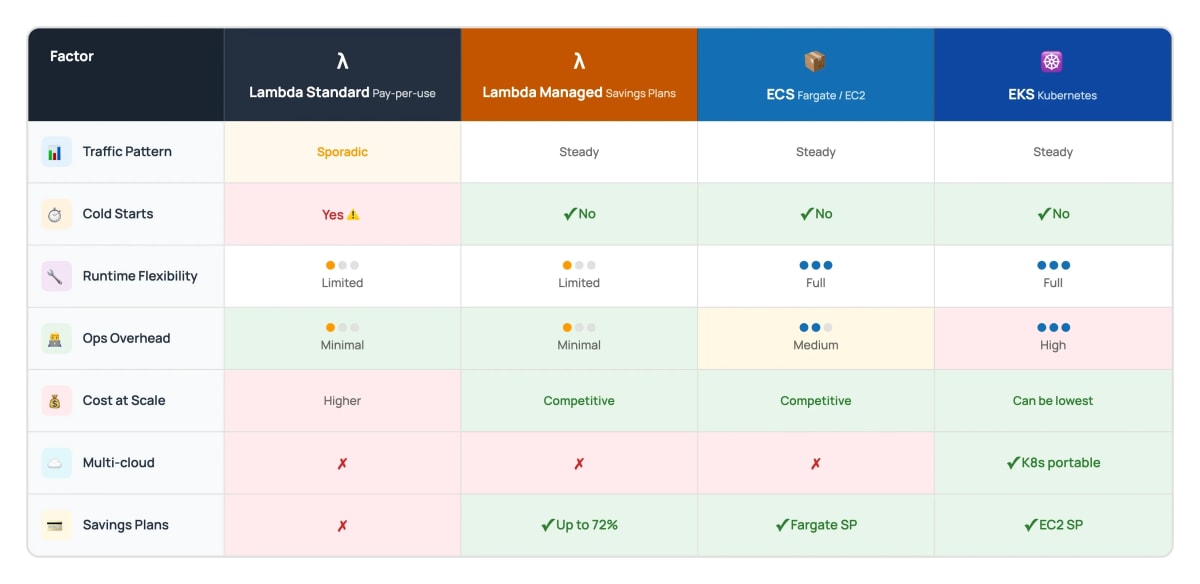
How the factors stack up
Here's a quick reference for the key decision factors:
The pragmatic approach: hybrid architectures
Most production systems we build use multiple compute models. Pure serverless or pure containers is rare.
A typical pattern looks like this: API Gateway routes traffic to different backends based on the workload. High-traffic user-facing APIs go to Lambda Managed Instances for consistent latency. Event handlers and async jobs go to Lambda Standard for cost efficiency. Long-running processes and batch jobs go to ECS Fargate.
This isn't complicated to set up. AWS service integration handles routing. Each workload runs on the compute model that fits it best.
We've found five patterns that work well:
- User-facing APIs perform best on Lambda Managed Instances. Consistent latency matters. Managed Instances delivers.
- Event processing fits Lambda Standard. Traffic is inherently variable. Pay-per-invocation aligns costs with usage.
- Background jobs can go either way. Short jobs under 15 minutes work on Lambda. Longer jobs need ECS.
- Data processing depends on complexity. Simple transformations work on Lambda. Heavy compute jobs with large memory needs fit better on ECS with right-sized task definitions.
- Legacy services being modernized usually start on ECS. Containerization is a smaller step than serverless refactoring.
What we've learned from our own projects
We don't just advise on serverless architecture. We run it ourselves.
Several of our client projects have been running on Lambda Standard for years. These are dedicated systems we still maintain and actively develop new features for. The serverless model has served them well. Deployments are simple. Scaling is automatic. Infrastructure management is minimal. Our engineers focus on business logic, not container orchestration.
We're also building a new internal product on top of one of these legacy serverless systems. It's still experimental, but the experience keeps reinforcing our belief: serverless architecture brings more value than most teams expect.
The benefits compound over time. No patching servers. No capacity planning meetings. No 3am alerts about node failures. Lambda handles that. Your team ships features instead.
When we started, serverless felt like a tradeoff. Simpler operations, but limited control. Higher costs at scale. Cold start problems. Those tradeoffs are disappearing. Lambda Managed Instances addresses most of them. The remaining cases where containers win are getting narrower.
If you're starting a new project today and your workload fits Lambda's constraints, we'd recommend serverless as the default.
Containers are the exception, not the rule.
Migration paths
Moving from Lambda Standard to Managed Instances
This migration is straightforward. First, analyze your traffic patterns. Look at CloudWatch metrics for the past 30-60 days. If traffic is steady with predictable daily and weekly patterns, Managed Instances makes sense.
Enable Managed Instances in your Lambda configuration. Test with production traffic. Monitor latency improvements from eliminated cold starts.
Once confident, commit to a Savings Plan. Start with 1-year if uncertain. Move to 3-year when you have conviction.
Adjust concurrency settings based on observed traffic. Over-provisioning wastes reserved capacity. Under-provisioning creates throttling.
Moving from containers to Lambda Managed Instances
This migration is bigger. Consider it when operational overhead of container management exceeds the value your team gets. If your team spends significant time managing clusters, updating base images, and troubleshooting orchestration issues, serverless removes that burden.
Teams without deep container expertise often benefit from switching. Lambda's developer experience is simpler. Less infrastructure knowledge required.
But check the constraints first. Lambda has memory limits (10GB max), duration limits (15 minutes), and runtime restrictions. Complex dependency trees can be problematic. Multi-cloud portability goes away.
Don't migrate if you need custom runtimes Lambda doesn't support. Don't migrate if you have complex dependencies that don't fit in a Lambda layer. Don't migrate if multi-cloud matters.
Getting the costs right
Cost optimization approaches differ by compute model.
Lambda Managed Instances
Memory allocation affects both performance and cost. More memory means faster execution and more CPU. Sometimes increasing memory reduces total cost because execution time drops. Test different configurations.
Commit to Savings Plans when traffic is predictable. 1-year plans save 17%. 3-year plans save up to 72%. The savings compound at scale.
Watch concurrency settings. Provisioned concurrency has a cost whether you use it or not. Only provision for latency-critical paths.
Container services
Fargate Spot saves up to 70% for fault-tolerant workloads. Batch processing, async jobs, and tasks that can restart cleanly are good candidates.
Right-size your task definitions. Many teams over-provision CPU and memory "just in case." Review actual utilization. Reduce allocations to match actual needs.
EC2 Spot instances work well for EKS node groups running fault-tolerant workloads. Combined with cluster autoscaling, you get significant savings.
Compute Savings Plans apply to both Fargate and EC2. Commit based on your baseline usage.
What this means for your team
The serverless vs containers decision is no longer binary. Lambda Managed Instances creates a middle option: serverless operations with container economics.
Five takeaways from our work since re:Invent:
-
Lambda Managed Instances closes the cost gap at scale. The "Lambda is expensive" argument is weaker now.
-
Cold starts are solved for steady workloads. Managed Instances eliminates this Lambda limitation.
-
Most architectures benefit from mixing compute models. Use each service where it fits best.
-
Operational simplicity has real value. Factor engineer time into your cost calculations, not just AWS bills.
-
Traffic pattern remains the primary decision driver. Sporadic means Lambda Standard. Steady means Lambda Managed or containers.
The right question changed. Stop asking "serverless or containers?" Start asking "which compute model fits this workload?"
Where to go from here
Four steps to apply this framework:
-
Audit your current workloads. Categorize each by traffic pattern and latency requirements. Pull CloudWatch metrics for the past 60 days.
-
Pilot Lambda Managed Instances. Pick one steady-state workload. Enable Managed Instances. Measure latency improvements. Calculate cost with Savings Plans.
-
Calculate total cost of ownership. Include operational overhead. How many engineer hours go to container management monthly? What's that worth?
-
Build decision guidelines for your organization. Use this framework as a starting point. Adjust based on your team's expertise and organizational constraints.
Need help evaluating your architecture? INNOMIZE works with founders and engineering teams to optimize cloud infrastructure. Reach out if you want a second opinion on your compute strategy.