You ask AI to research a topic. It gives you a confident, detailed response. Looks great. You use it.
Later, you find out half the facts were wrong. A statistic was invented. A source doesn't exist. A company name was slightly off.
This happens constantly. AI research fails because most people prompt for answers when they should prompt for process.
In Part 1, we covered writing prompts. Research is different. Writing is about output quality. Research is about information accuracy. The stakes are higher because wrong information creates wrong decisions.
This guide teaches you how to prompt AI for research that's useful, structured, and verifiable.
Why AI Research Goes Wrong

Before fixing your prompts, understand why AI research fails by default.
AI hallucinates. When AI doesn't know something, it doesn't say "I don't know." It invents. Fake statistics. Non-existent studies. Sources that sound real but aren't. The more specific your question, the higher the risk of fabrication.
AI goes shallow. The first response is almost always surface-level. It covers the obvious points, misses nuance, and skips the details that matter. You wanted analysis. You got a summary.
AI doesn't verify. AI has no fact-checking mechanism. It generates plausible text, not verified truth. Every claim needs external confirmation for anything important.
AI answers what you asked, not what you need. If you ask a narrow question, you get a narrow answer. AI won't tell you that you're asking the wrong question. It just answers.
The fix is treating AI as a research assistant, not a research source. Use it to find, structure, and synthesize information. Verify the facts elsewhere.
The 4 Elements of a Good Research Prompt

Every strong research prompt includes some combination of these four elements:
| Element | What It Does | Example |
|---|
| Scope | Define boundaries | "Focus on B2B SaaS companies, not consumer apps" |
| Depth | How detailed to go | "Give me an overview first, then I'll ask follow-ups" |
| Output format | How to structure results | "Use a comparison table with these columns..." |
| Verification cues | Flag uncertainty | "Mark any claims you're not confident about" |
You don't need all four every time. But the more specific your research prompt, the more useful the output.
Let's see how this applies across different research types.
Market & Competitive Research
The Common Mistake
Tell me about competitors in the project management software space.
You'll get a generic list: Asana, Monday, Trello, Notion. Surface-level descriptions. Nothing you couldn't find in 30 seconds on Google.
The Better Approach
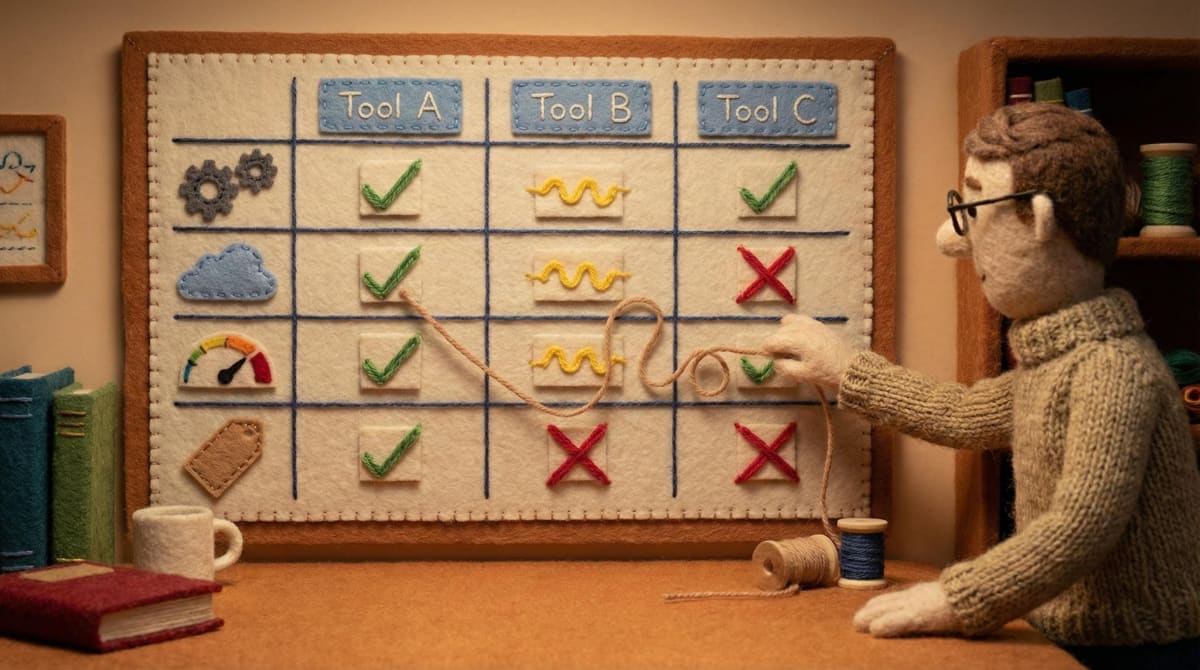
Define the specific dimensions you want to compare:

I'm researching project management tools for a 20-person software agency.

Our key requirements:
- Client-facing project visibility (clients can see progress)
- Time tracking built in
- Integration with Slack and GitHub

Compare these tools on those three dimensions: Asana, Monday, Teamwork, and ClickUp.

Format: Table with tool name, each requirement (supported/partial/not supported), and pricing tier that includes these features.

Flag any information you're uncertain about.
Why this works: You defined the use case, the specific requirements, the tools to compare, and the output format. AI can now give you a structured comparison instead of generic descriptions.
Template
Template:
I'm researching [CATEGORY] for [SPECIFIC USE CASE].

Key requirements:
- [REQUIREMENT 1]
- [REQUIREMENT 2]
- [REQUIREMENT 3]

Compare these options: [OPTION 1], [OPTION 2], [OPTION 3]

Format: [TABLE/LIST/PROSE] comparing each option on the requirements above.

Flag any information you're uncertain about.
Example:
I'm researching CRM tools for a 10-person B2B sales team.

Key requirements:
- Email sequence automation
- Integration with LinkedIn Sales Navigator
- Pricing under $50/user/month

Compare these options: HubSpot, Pipedrive, Close, Apollo

Format: Table with tool name, each requirement (yes/no/partial), and starting price per user.

Flag any information you're uncertain about.
Learning a New Topic Fast
The Common Mistake
Explain Kubernetes to me.
You'll get a textbook explanation that's either too basic or too technical. It covers everything and nothing. You finish reading and still don't know where to start.
The Better Approach
Use layered prompting. Start with context and scope, then drill down:
Step 1: Scoped overview
I'm a backend developer who understands Docker but has never used Kubernetes.

Give me a 3-paragraph overview of Kubernetes:
1. What problem it solves (that Docker alone doesn't)
2. The core concepts I need to understand first
3. When a team should consider using it vs. simpler alternatives

Keep it practical. Skip the history.
Step 2: Drill down on specifics
You mentioned "pods" and "services" as core concepts.

Explain the relationship between them using a concrete example: a web app with a frontend, backend API, and database.

Keep it short. I'll ask follow-ups.
Step 3: Test understanding
Based on what you explained, here's my understanding:
[Write what you think you understood]

What did I get wrong or oversimplify?
Why this works: You learn in layers. Each prompt builds on the previous one. You control the depth and can course-correct if the explanation goes in the wrong direction.
Template
Template:
I'm a [YOUR BACKGROUND] learning about [TOPIC].

Give me an overview covering:
1. [SPECIFIC ANGLE 1]
2. [SPECIFIC ANGLE 2]
3. [SPECIFIC ANGLE 3]

Keep it [LENGTH/STYLE CONSTRAINT].
Example:
I'm a product manager with non-technical background learning about API integrations.

Give me an overview covering:
1. What an API is in plain terms (no jargon)
2. How our product would use APIs to connect with other tools
3. What questions I should ask engineering when scoping an integration

Keep it under 400 words. Use analogies where helpful.
Fact-Finding with Verification

The Common Mistake
What percentage of startups fail in the first 5 years?
AI will give you a number. It might be right. It might be invented. You have no way to know without checking.
The Better Approach
Ask AI to separate facts from inference and flag confidence levels:
I need data on startup failure rates.

For each claim, indicate:
- The specific statistic
- The source (if you know it)
- Your confidence level (high/medium/low)
- Whether this is a fact or an inference

I'll verify key claims independently. Help me prioritize which ones to check.
Why this works: You're not asking AI to be right. You're asking it to be transparent about uncertainty. This gives you a starting point for verification instead of false confidence.
Verification Workflow
After AI gives you research:
- Identify key claims that your decision depends on
- Spot-check 2-3 claims using primary sources (company sites, published reports, official data)
- If AI was wrong on those, treat the rest with more skepticism
- If AI was right, you can trust the structure while still verifying critical facts
Template
Template:
I need information on [TOPIC].

For each claim, indicate:
- The specific data point
- The source (if known)
- Confidence level (high/medium/low)
- Whether this is a fact or inference

List the claims I should verify first.
Example:
I need information on remote work adoption trends since 2020.

For each claim, indicate:
- The specific data point
- The source (if known)
- Confidence level (high/medium/low)
- Whether this is a fact or inference

List the claims I should verify first before using in a presentation.
Summarizing & Synthesizing Sources

The Common Mistake
Summarize this article.
You'll get a generic summary that covers the main points but misses what you needed from it.
The Better Approach
Define what you need from the summary:
I'm reading this article about pricing strategies for SaaS products.

[Paste article or key sections]

Extract:
1. The 2-3 main arguments the author makes
2. Any specific data or examples they cite
3. Actionable recommendations I could apply to a B2B product

Skip the filler. Focus on what's useful.
Why this works: You told AI what "useful" means for your purpose. Instead of a neutral summary, you get targeted extraction.
For Multiple Sources
When synthesizing several sources:
I have three articles about [TOPIC]. I'll share them one at a time.

After I share all three, I want you to:
1. Identify where they agree
2. Identify where they contradict each other
3. List claims that only one source makes (may need verification)
4. Highlight the strongest evidence-backed points

Wait for all three before synthesizing.
Template
Template:
I'm reading this [CONTENT TYPE] about [TOPIC].

[Paste content]

Extract:
1. [SPECIFIC ELEMENT 1]
2. [SPECIFIC ELEMENT 2]
3. [SPECIFIC ELEMENT 3]

Skip [WHAT TO IGNORE]. Focus on [WHAT MATTERS].
Example:
I'm reading this blog post about engineering team scaling.

[Paste content]

Extract:
1. The main argument about when to hire vs. outsource
2. Any specific team sizes or thresholds they mention
3. Red flags they identify for scaling too fast

Skip the intro and promotional content. Focus on practical frameworks.
The Verification Habit
Research prompting only works if you build a verification habit.
Rule: Never trust AI facts for anything that matters.
This doesn't mean AI research is useless. It means AI gives you a starting point, not an endpoint.
What to verify:
- Statistics and percentages
- Company names, founding dates, funding amounts
- Claims about specific products or features
- Quotes attributed to people
- "Studies show" or "research indicates" statements
What you can usually trust:
- General concept explanations
- Framework structures
- Process descriptions
- Comparison dimensions (though verify the actual comparisons)
Quick verification prompt:
Which claims in your previous response are you least confident about? List the top 3 I should verify first.
This helps you prioritize where to spend verification time.
Prompt Templates to Steal
Market & Competitive Research
Template:
I'm researching [CATEGORY] for [USE CASE].
Key requirements: [LIST]
Compare these options: [LIST]
Format: [TABLE/LIST/PROSE]
Flag uncertain information.
Example:
I'm researching email marketing tools for a D2C e-commerce brand.
Key requirements: Abandoned cart sequences, Shopify integration, A/B testing
Compare these options: Klaviyo, Mailchimp, Omnisend, Drip
Format: Table with requirements as columns, tools as rows
Flag uncertain information.
Learning a New Topic
Template:
I'm a [BACKGROUND] learning about [TOPIC].
Give me an overview covering: [SPECIFIC ANGLES]
Keep it [CONSTRAINTS].
Example:
I'm a startup founder with finance background learning about technical debt.
Give me an overview covering: What it is, how it accumulates, when to address it vs. accept it
Keep it practical. Use business analogies. Under 500 words.
Fact-Finding with Verification
Template:
I need information on [TOPIC].
For each claim: data point, source, confidence level, fact vs. inference.
List claims to verify first.
Example:
I need information on cloud infrastructure market share in 2025.
For each claim: data point, source, confidence level, fact vs. inference.
List claims to verify first. I'm using this for a strategy presentation.
Summarizing Sources
Template:
I'm reading this [TYPE] about [TOPIC].
[Content]
Extract: [SPECIFIC ELEMENTS]
Skip [IGNORE]. Focus on [PRIORITY].
Example:
I'm reading this investor memo about AI infrastructure trends.
[Paste memo]
Extract: Key predictions, market size claims, companies mentioned as leaders
Skip the disclaimers and general AI hype. Focus on specific, actionable insights.
What This Series Covered
Part 1 covered writing prompts. The core principle: specific input creates better output. Define role, context, task, format, and examples.
Part 2 covered research prompts. The core principle: prompt for process, not answers. Define scope, depth, output format, and verification cues.
Both come down to the same thing: AI responds to what you give it. Vague prompts get vague results. Specific prompts get useful results.
The skill is knowing what to specify.