Most organizations get this backwards. Here's the framework that actually works.
The Pattern Everyone Keeps Seeing
Look at any organization adopting AI right now. Different industries, different challenges, but the same pattern keeps emerging.
Teams buy tools first. Then they struggle to make them work.
At INNOMIZE, we're navigating this ourselves. We're also watching peers, partners, and the broader industry experiment with AI adoption. The patterns are consistent.
The sequence usually looks like this:
A leader reads about AI productivity gains. They approve budget for licenses. The team gets access to ChatGPT, Claude, Copilot, or whatever tool is trending. There's initial excitement. People experiment. Some early wins get shared.
Then reality sets in.
Quality becomes inconsistent. Some outputs are great, others are embarrassing. Nobody knows why. Context gets lost between sessions. People repeat the same prompts, get different results, waste time debugging AI behavior instead of doing actual work.
Six months later, the tool sits underused. Or worse, it's actively creating problems: content that sounds generic, code that nobody understands, reports with unverified numbers, decisions based on AI hallucinations that went unchecked.
This pattern is consistent enough to recognize the root cause.
It's not the tool. It's the approach.
Why Tools-First Fails
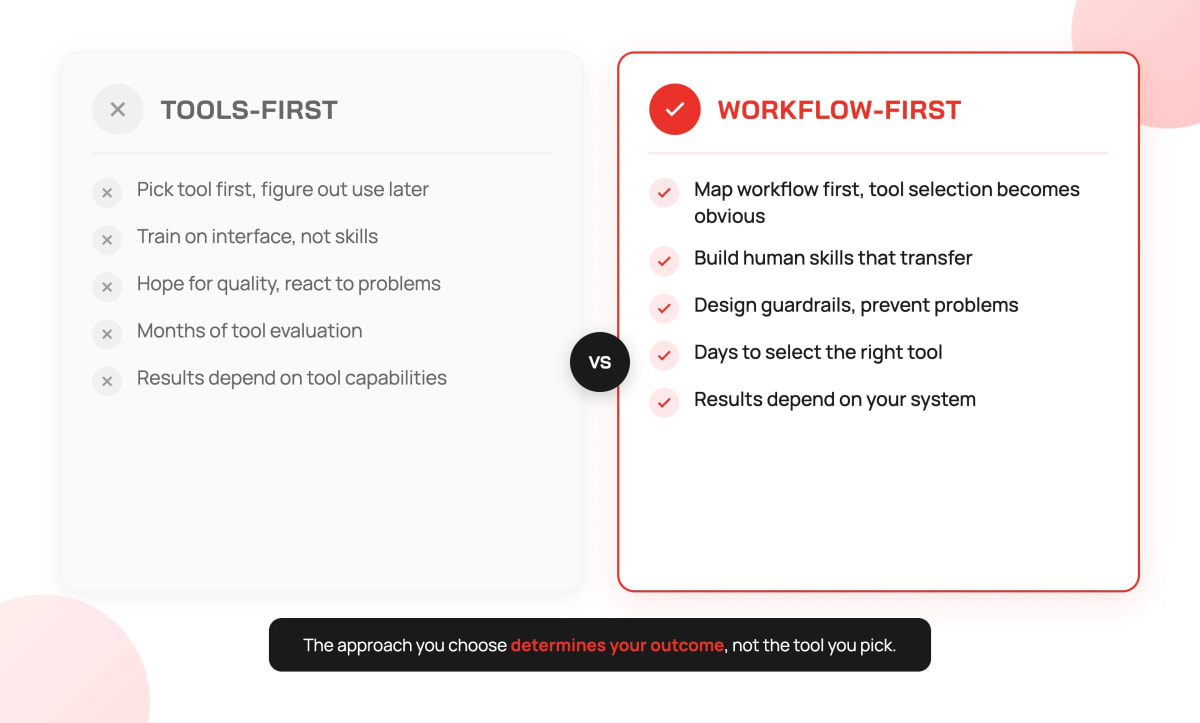
Most organizations approach AI adoption like buying new software. Evaluate features. Compare pricing. Pick a vendor. Roll out licenses. Train people on the interface.
This works for productivity software. It doesn't work for AI.
Here's why.
Traditional software does what you tell it. Click this button, get this result. The software is deterministic. The same input produces the same output. Training means teaching people which buttons to click.
AI is different. AI interprets your intent and generates a response. The same prompt can produce different outputs. The quality depends not just on the tool, but on how you frame the problem, what context you provide, how you evaluate the output, and what you do when the output is wrong.
This is why tool-first adoption fails. You're optimizing for the wrong variable.
The tool is 20% of the outcome. The workflow is 80%.
There's a deeper problem. Many teams treat prompting as the work itself. They optimize for better prompts without mapping decisions, checkpoints, or ownership first.
Prompting is execution. The real work happens before you touch the model: defining what success looks like, breaking the problem into steps, knowing how to validate the output.
Skip that work, and better prompts just produce faster wrong answers.
What Actually Goes Wrong
The same failure modes appear across industries. The specifics differ, but the structure is identical.
Marketing teams start using AI for content creation. The first few pieces are impressive. Leadership gets excited. The team scales up, producing more content faster. But nobody establishes review processes. Brand voice drifts. Tone becomes inconsistent. Three months later, the content feels generic and disconnected from the brand. Customers notice. Engagement drops. The team blames the AI tool and starts evaluating alternatives.
The problem wasn't the tool. The problem was no workflow for maintaining brand voice at scale.
Finance teams adopt AI for report generation. Analysts save hours on first drafts. But validation steps don't change. Nobody updates the review process to account for AI-generated content. Errors slip through. One quarter, a projection is wrong because the AI misinterpreted historical data and nobody caught it. Trust evaporates. The team reverts to manual processes "until we can trust the AI."
The problem wasn't the tool. The problem was no workflow for validating AI output.
Operations teams automate routine tasks with AI. Ticket routing, initial responses, data entry. Efficiency improves on the happy path. But edge cases multiply. When something doesn't fit the expected pattern, there's no process for handling it. Exceptions pile up. Response times for complex issues actually increase because nobody knows who owns the exceptions.
The problem wasn't the tool. The problem was no workflow for exception handling.
Engineering teams use AI to write code faster. Velocity metrics improve. More features ship. But comprehension doesn't keep pace with production. The codebase grows with code that nobody fully understands. When bugs appear, debugging takes longer because the mental model is incomplete. Technical debt accelerates. Six months later, the team is slower than before AI because they're maintaining code they didn't write and don't understand.
The problem wasn't the tool. The problem was no workflow for maintaining comprehension.
The common thread across all these examples is the same: tools without workflow design equals faster mistakes.
This is the uncomfortable truth about AI adoption. AI is a speed multiplier. It makes everything faster, including the things you're doing wrong. If your process has gaps, AI will find them. If your validation is weak, AI will expose it. If your quality standards are unclear, AI will produce inconsistent output.
If your process is broken, AI multiplies the breakage.
The Framework: Workflow First, Tools Last
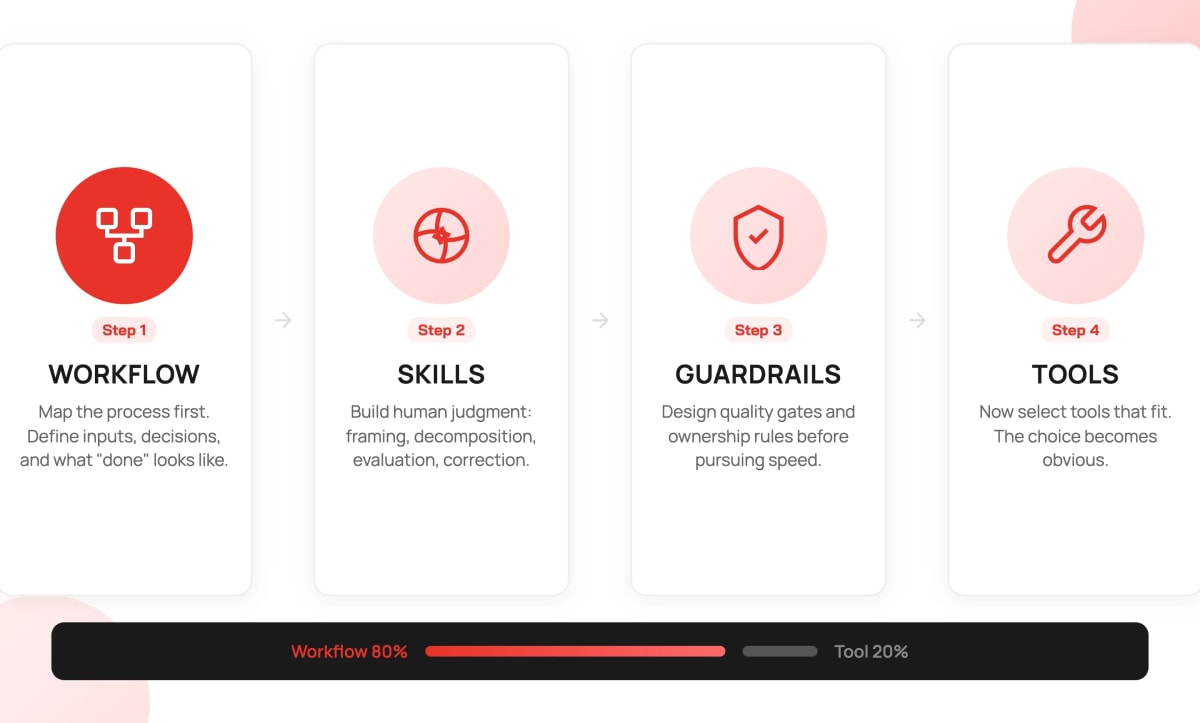
This is the four-step framework we developed and are now applying at INNOMIZE. The order matters. Each step builds on the previous one.
Step 1: Start with the Workflow
Before any AI tool enters the picture, map the workflow you want to improve.
Pick one process that matters. Not the easiest process. Not the most complex. Pick one that's important enough to justify attention but contained enough to manage.
Then map it end to end. We ask five questions:
Where does input come from?
Who or what initiates this workflow? Is it a customer request? An internal trigger? A scheduled event? Understanding the input helps you understand what information is available at the start and what context needs to be gathered.
What decisions get made?
Every workflow contains decision points. Some are explicit: approve or reject, route to team A or team B. Some are implicit: how to phrase something, what to include or exclude, how much detail to provide. Map all of them. Decisions are where AI can help, but also where AI can go wrong.
What does done look like?
Define the output before you design the process. What format? What quality level? What information must be present? What would disqualify an output? If you can't articulate done, you can't evaluate whether AI is helping or hurting.
Where does validation happen?
Every workflow needs checkpoints. Where do humans verify that work is on track? Where do errors get caught? If validation only happens at the end, errors compound through the entire process before anyone notices.
Who owns the final call?
AI can assist, but someone must own the outcome. Who is accountable for the result? Who makes the call when AI output is ambiguous? Who decides when to override AI recommendations?
If you cannot draw the workflow, you cannot automate it.
Organizations often struggle to articulate their current process before AI. They have implicit knowledge distributed across team members. Tribal practices that vary by person. Undocumented steps that everyone assumes everyone knows.
AI forces clarity because automation requires explicit rules.
This step alone often improves operations. The workflow mapping exercise frequently reveals gaps, redundancies, or bottlenecks that have nothing to do with AI. Fixing those issues delivers value before any AI is introduced.
Step 2: Define the Skills
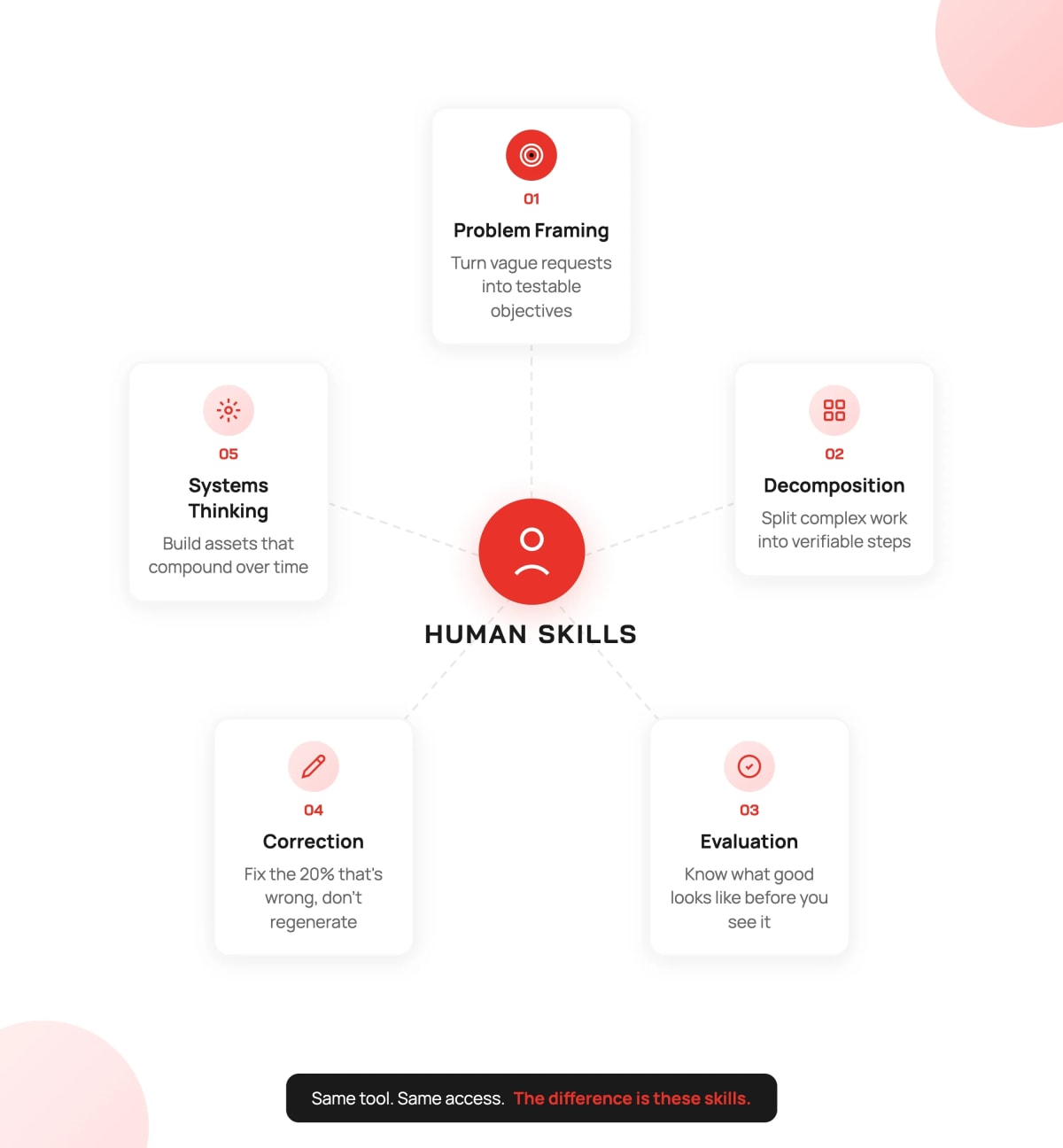
Once the workflow is clear, identify the skills required to execute it well with AI assistance.
This is where most adoption efforts fail. Organizations assume AI training means teaching people how to use the tool. How to write prompts. How to navigate the interface. How to access features.
Tool training is necessary but not sufficient. The real skills are human skills that make AI output useful.
Problem Framing
The ability to turn vague requests into testable objectives.
"Make this better" is not a problem statement. "Reduce customer response time from 4 hours to 1 hour while maintaining satisfaction scores above 4.5" is a problem statement.
AI responds to the problem you give it. If the problem is vague, the solution will be vague. If the problem is specific, the solution can be specific.
Teams prompt AI with "Write a marketing email" and wonder why the output is generic. The prompt is generic. "Write a marketing email for our existing customers announcing our new feature X, emphasizing benefit Y, with a tone that matches our brand voice guidelines, and a clear call to action to schedule a demo" produces dramatically better results.
Problem framing is a skill. It can be taught. It must be practiced.
Decomposition
The ability to split work into verifiable steps.
Complex tasks fail when given to AI as a single request. "Write a quarterly business review" is too big. The AI doesn't know your data, your context, your audience, your format preferences. It will guess, and it will guess wrong.
Decomposition means breaking the work into steps where each step can be verified before moving to the next.
Gather the data. Verify the data is correct. Analyze trends. Verify the analysis makes sense. Draft the summary. Verify the summary captures the key points. Format the output. Verify the format matches requirements.
Each step is small enough to validate. Errors get caught early. The final output is built from verified components.
Evaluation
The ability to spot wrong fast.
Before you see AI output, you should know what good looks like. What must be present? What would be unacceptable? What are the quality criteria?
Teams without evaluation skills accept plausible-looking output. AI is very good at producing plausible-looking output. Plausible is not the same as correct.
Evaluation means checking output against criteria, not just reading it and thinking "that seems fine." It means having a checklist. It means knowing the domain well enough to spot errors that sound reasonable but aren't.
Correction
The ability to fix, not regenerate.
When AI output is 80% right, the efficient response is to fix the 20%. Edit. Revise. Correct.
The inefficient response is to regenerate. Try a different prompt. Hope the next attempt is better. Repeat until something acceptable appears.
Correction requires understanding what the AI produced. It requires the domain knowledge to know what's wrong and how to fix it. It requires editing skills.
Teams that regenerate instead of correct waste enormous amounts of time. They also never improve their prompts because they don't analyze what went wrong.
Systems Thinking
The ability to reduce future cost.
Every workflow will be repeated. The question is whether each repetition is independent work or whether the system improves over time.
Systems thinking means asking: How do I make this easier next time? Can I create a template? Can I document what worked? Can I build a prompt library? Can I create examples that guide future AI interactions?
Teams with systems thinking build assets. Their AI-assisted workflows get better over time. Teams without systems thinking do the same work over and over, never compounding their learning.
These five skills determine AI productivity more than tool selection.
This pattern shows up consistently. Within the same organization, using the same tools, with the same training and the same access, outcomes vary dramatically. Research suggests about 20% of people become significantly more productive with AI while another 20% see minimal benefit. The difference isn't aptitude or enthusiasm. The difference is whether they've developed these skills.
The good news is that all five skills can be taught. They require practice, but they're not innate talents. Organizations that invest in skill development before tool deployment consistently see better adoption outcomes.
Step 3: Add Guardrails Before Speed
The natural instinct is to remove friction. AI is supposed to make things faster. Guardrails feel like slowing down.
This instinct is wrong.
Adoption fails when outputs are untrusted. Once trust is lost, it's extremely difficult to rebuild. People revert to manual processes. They work around the AI instead of with it. The tool becomes shelf-ware.
Guardrails are not friction. Guardrails are what make trust possible.
Quality Checklists
Define ready to ship before AI touches the work.
What must every output contain? What format is required? What information is mandatory? What would disqualify an output?
Write these down. Make them explicit. Use them consistently.
A checklist takes 30 seconds to run through. Catching an error before it ships saves hours or days. The math is obvious, but teams skip checklists because they feel slow. They're not slow. They're insurance.
Review Gates
Not every output needs review. But high-stakes outputs always do.
Define the threshold. What constitutes high stakes? Customer-facing content? Financial numbers? Legal implications? Decisions that are hard to reverse?
For high-stakes outputs, build in review gates. A second pair of eyes. A sign-off before shipping. A brief pause between creation and publication.
Review gates also create feedback loops. Reviewers learn what errors to watch for. Creators learn what mistakes they make. The system improves.
Source of Truth Rules
When does AI browse external information? When must it cite sources? What information is authoritative versus suggestive?
AI can confidently present incorrect information. It doesn't know what it doesn't know. It won't tell you when it's guessing.
Source of truth rules establish when AI output needs verification against authoritative sources. Internal databases. Official documentation. Verified data. Human experts.
Without these rules, teams treat AI output as authoritative when it isn't. Errors propagate.
Data Boundaries
What data never enters a model?
Customer personally identifiable information. Proprietary formulas. Confidential business strategies. Competitive intelligence. Anything covered by NDA or regulation.
Define these boundaries before adoption, not after an incident. Make them explicit. Train people on them. Enforce them.
Data boundary violations can be catastrophic. The convenience of AI assistance is not worth the risk of exposing sensitive information.
Named Ownership
Every AI-assisted output needs a named owner.
Not "the team reviewed this." A specific person who verified, approved, and takes responsibility for the result.
When someone's name is on the work, they read it before shipping. Without named ownership, AI output gets rubber-stamped. Errors slip through because nobody feels personally accountable.
Some teams add explicit disclosure: "AI-assisted, reviewed by [Name]." This creates accountability and helps track which workflows need attention.
Quality Metrics, Not Just Speed
When AI adoption begins, teams naturally celebrate velocity. Tasks completed faster. Hours saved per week. Output volume increased. These are the metrics that get reported to leadership. These are the numbers that justify the investment.
But these metrics tell an incomplete story. They measure quantity, not quality. They capture production without capturing consequences.
What actually matters is what happens after the output ships. Track error rate after AI introduction. Track rework frequency. Track time between delivery and first complaint. Track whether problems are caught internally or externally.
These metrics reveal whether AI is actually helping or just creating problems faster. Faster output means nothing if you're fixing mistakes two weeks later. Speed without quality is just accelerated failure.
Guardrails feel like overhead when things are going well. They're invisible infrastructure. You don't notice them until you need them.
Teams with clear guardrails actually adopt faster. Because they trust the output, they use AI more aggressively. Because they use AI more, they get better at it. The guardrails enable speed rather than limiting it.
Step 4: Then Pick Tools
Now, finally, you're ready to select tools.
Notice what happened. You mapped the workflow. You identified the skills. You designed the guardrails. You know exactly what you need.
Tool selection becomes straightforward.
Interface type: Does the workflow need a chat interface where people interact conversationally? Or an embedded assistant integrated into existing tools? Or an automated agent that runs without human interaction?
Model capability: Does the workflow need general knowledge? Or domain-specific expertise? Would a fine-tuned model outperform a general model?
Deployment model: Does data sensitivity require on-premise deployment? Or is cloud-based acceptable? What are the compliance requirements?
Automation level: Is this a human-in-the-loop workflow where AI assists? Or can steps be fully automated? Where are the handoff points?
Audit requirements: Does the workflow need logging for compliance? Version history for accountability? Ability to trace decisions back to their inputs?
These questions have clear answers when the workflow is clear. The tool fits the system, not the other way around.
Organizations spend months evaluating AI tools before defining what they want to accomplish. They create comparison matrices. They run pilots. They debate features. The evaluation becomes a distraction from the real work.
When workflow is clear, tool selection takes days, not months. Often, the right tool is obvious once you know what you need.
A Practical Adoption Plan
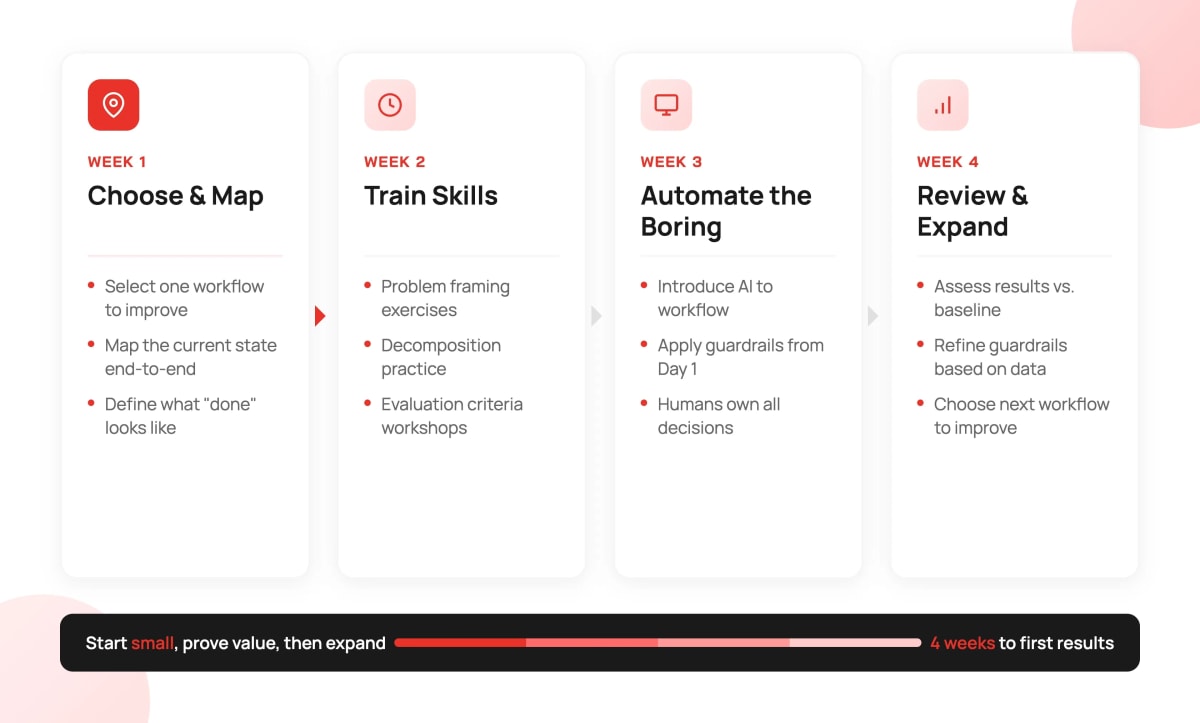
Theory is useful. Application is better.
Here's the four-week approach we recommend for initial AI adoption. This applies to a single workflow. After proving the approach, you can parallelize across multiple workflows.
Week 1: Choose and Map
Select one workflow. Not the most complex. Not the simplest. Pick something meaningful but contained.
Map the current state. Interview the people who do the work. Document every step, even the ones that seem obvious. Especially the ones that seem obvious. Those are often where implicit knowledge hides.
Define acceptance criteria. What does good output look like? Write it down. Get agreement from stakeholders.
Establish an evaluation mechanism. How will you know if AI is helping? What metrics matter? Don't just measure speed. Measure quality, consistency, and trust.
Week 2: Train Core Skills
Focus on the three foundational skills: problem framing, decomposition, and evaluation.
Problem framing: Practice turning vague requests into specific, testable objectives. Take real examples from the workflow. Convert them from fuzzy to precise.
Decomposition: Practice breaking complex tasks into verifiable steps. Take end-to-end workflows and decompose them. Identify where verification should happen.
Evaluation: Practice defining done before starting. Create checklists. Run through examples. Build the habit of evaluating against criteria.
Don't worry about AI tools yet. These skills apply regardless of which tool you eventually choose.
Week 3: Automate the Boring
Now introduce AI. Start with routine, low-stakes parts of the workflow.
Apply the guardrails you designed. Use the checklists. Staff the review gates. Enforce the data boundaries.
Keep humans on decisions and exceptions. AI handles the predictable parts. Humans handle the judgment calls.
Measure quality, not just speed. It's easy to go faster. The question is whether you're going faster in the right direction.
Week 4: Review and Expand
Assess what worked. What didn't work. Where did guardrails catch errors? Where did errors slip through?
Refine based on real usage. Adjust checklists. Modify review thresholds. Update training based on observed skill gaps.
Choose the next workflow. Apply the same approach. Build momentum through demonstrated success.
This timeline feels slow. One workflow in four weeks. But rushing AI adoption creates problems that take months to fix.
Starting small and proving value builds trust. Trust enables broader adoption. Broader adoption with trust is faster than rapid adoption without trust.
Warning Signs
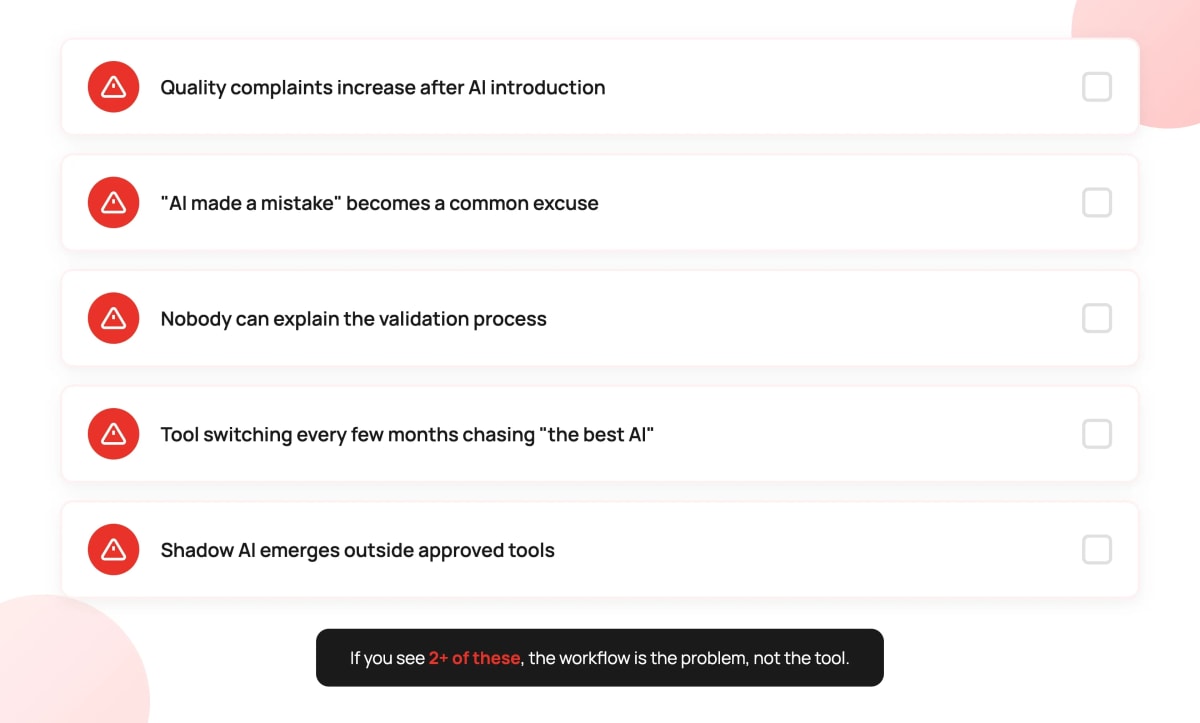
Watch for these signals that adoption is going wrong:
Quality complaints increase after AI introduction. If customers or stakeholders notice quality degradation, something is broken. AI should improve quality or at least maintain it. Quality decline means the workflow or guardrails aren't working.
"AI made a mistake" becomes an excuse. AI doesn't make mistakes. Processes make mistakes. If people blame AI for errors, they're not taking ownership of the output. The workflow isn't clear about accountability.
Nobody can explain how AI-assisted work gets validated. Ask someone: how do you know this AI output is correct? If they can't articulate a clear answer, validation isn't happening. Errors are getting through.
Tool switching every few months. If the team keeps evaluating new tools looking for the right solution, the problem isn't tools. The problem is workflow. No tool will solve a workflow problem.
Shadow AI emerges. People start using personal AI tools because the official tools don't fit their workflow. This is a signal that the official implementation doesn't match how work actually gets done.
These aren't AI problems. They're workflow design problems. Switching tools won't fix them. Redesigning the workflow will.
What This Means for Your Organization
If your AI adoption feels chaotic, you're not alone. Most organizations are struggling with the same challenges.
The good news: the problem is solvable. It's not a technology problem. It's an approach problem. Approach problems can be fixed.
The framework is straightforward:
- Map the workflow before selecting tools
- Build skills before scaling usage
- Establish guardrails before pursuing speed
- Select tools that fit the workflow, not the other way around
AI adoption is a workflow and skills decision. Tools follow.
What We're Doing at INNOMIZE
We're applying this framework ourselves.
Rather than claiming expertise we haven't earned, we're being transparent: this is the approach we've developed from observation, research, and first principles. Now we're testing it internally. We're documenting what works, what doesn't, and what we learn along the way.
This matters because everyone is still figuring this out. The organizations that will get AI adoption right aren't waiting for a proven playbook. They're building one through deliberate experimentation.
Our Commitment
We'll share what we learn. As we apply this framework, we'll publish the results: the successes, the failures, and the adjustments. Not polished case studies, but honest accounts of what actually happens when you try to adopt AI systematically.
If You're Navigating This Too
If this framework resonates with your challenges, we'd welcome a conversation. Not a sales pitch, a genuine exchange between people trying to solve the same problem.
We're building expertise through practice, and we believe the best insights come from practitioners comparing notes.
Let's talk about what you're seeing in your AI adoption journey.