As businesses grow and technology demands intensify, the traditional approach to managing IT infrastructure often falls short. Investing in expensive on-premises hardware, keeping up with maintenance, and scaling resources to match business needs can become overwhelming—both financially and operationally. This is where Infrastructure as a Service (IaaS) steps in to revolutionize IT infrastructure management.
IaaS enables businesses to access virtualized computing resources like servers, storage, and networking over the internet, offering a flexible, pay-as-you-go model. But beyond convenience, it addresses critical concerns:
-
How can businesses scale quickly without significant upfront investment?
-
What happens when there’s a sudden spike in demand or an unexpected disaster?
-
How can companies focus on growth without being bogged down by IT complexity?
In this article, we’ll explore how IaaS tackles these challenges head-on, its game-changing benefits, and the key scenarios where it’s making a tangible impact. Whether you're a startup looking to optimize costs or an enterprise navigating digital transformation, understanding IaaS could be the key to unlocking your next level of success.
Still deciding between SaaS, PaaS, or IaaS for your business? Check out our detailed guide: SaaS vs PaaS vs IaaS: Which Cloud Model Fits Your Business? to discover which solution aligns with your needs.
1. What is IaaS?
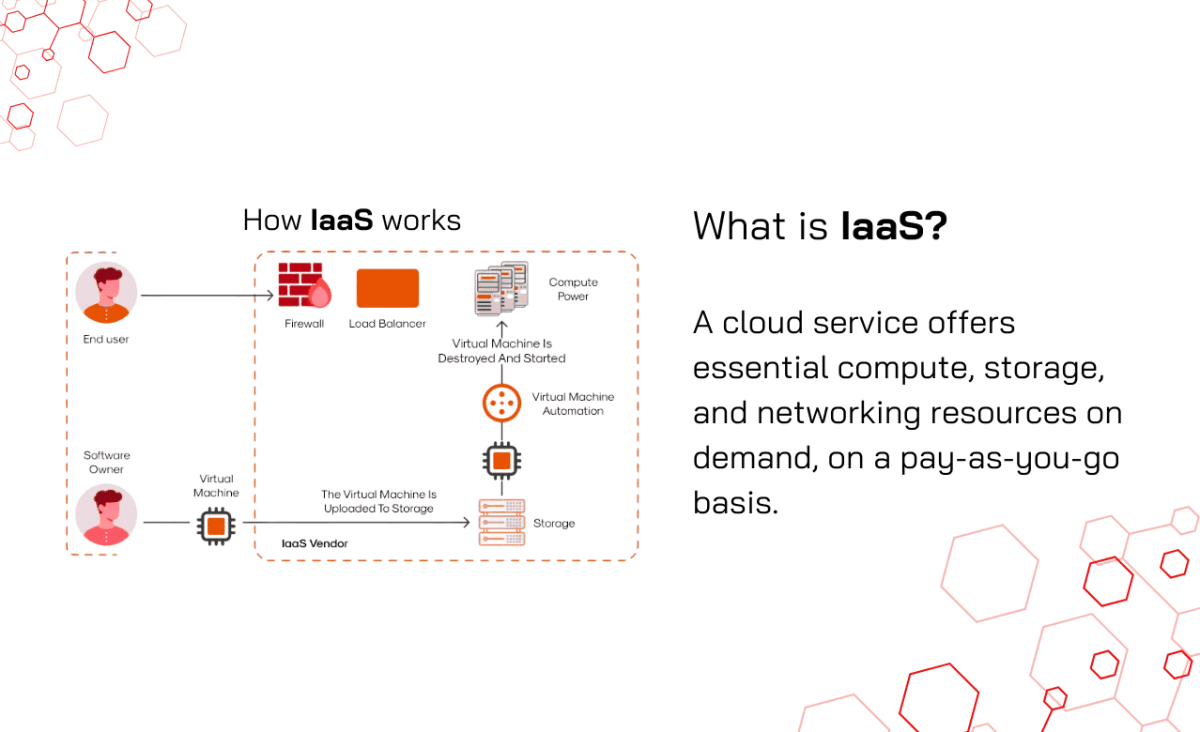
Infrastructure as a Service (IaaS) provides virtualized computing resources over the internet, giving users complete control over their IT infrastructure. With IaaS, organizations can rent IT infrastructure—such as servers, storage, and networking—on-demand, allowing for dynamic scaling according to their requirements.
2. Technical Characteristics
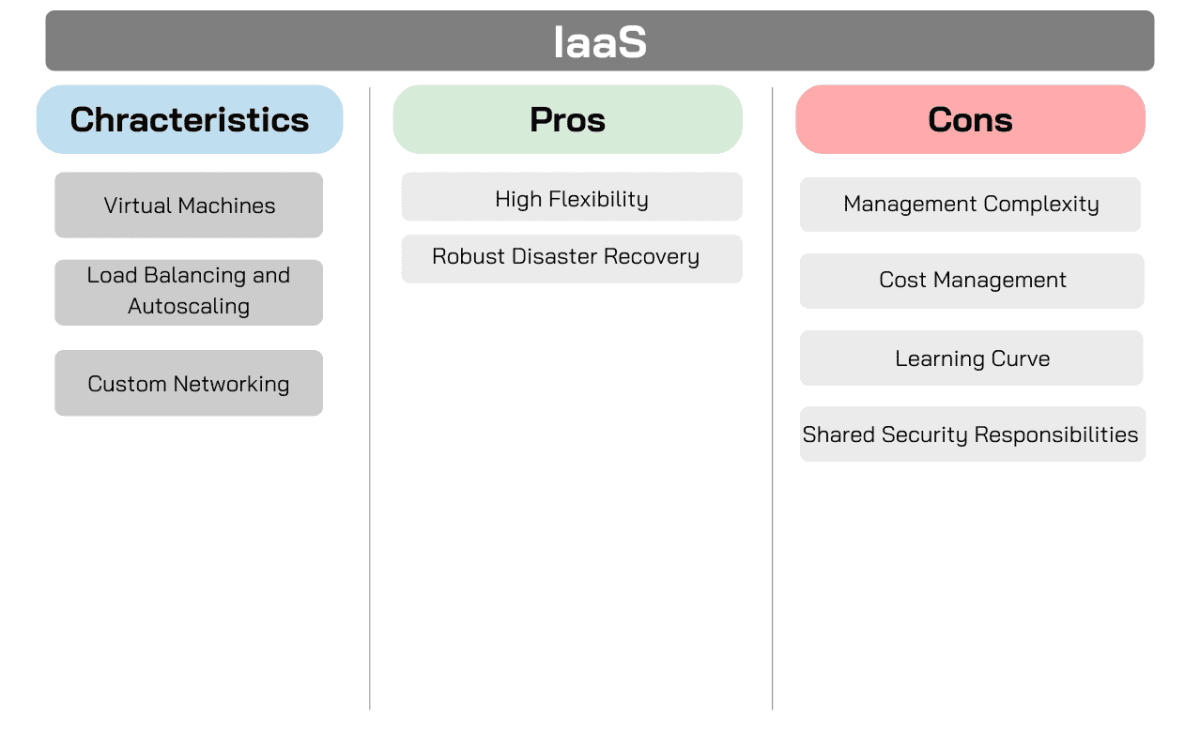
Users can deploy VMs on demand, allowing for flexible resource allocation based on workload requirements. For instance, AWS EC2 allows businesses to choose the instance type, operating system, and networking configurations according to their needs.
- Load Balancing and Autoscaling
IaaS platforms typically offer load balancing services that distribute incoming traffic across multiple servers, enhancing availability. Autoscaling adjusts resources dynamically based on traffic patterns, ensuring applications can handle fluctuating demands without performance degradation.
Users have the ability to configure their network architecture, including firewalls, IP address management, and routing policies. This customization is vital for organizations with specific security or compliance requirements.
Advantages
IaaS provides maximum customization options, allowing organizations to build tailored infrastructure that meets specific technical requirements. This flexibility is particularly beneficial for businesses with unique operational demands.
IaaS platforms typically offer backup and recovery solutions, enhancing business continuity. Organizations can implement redundant systems across multiple locations to ensure data integrity and availability.
Disadvantages
- Management Complexity
IaaS requires a skilled IT team to effectively manage, monitor, and optimize infrastructure. Organizations may face challenges in maintaining performance and security without adequate expertise.
Solution: To address the complexity of managing IaaS, businesses can utilize automated tools like AWS CloudWatch or Azure Monitor to streamline monitoring and optimize performance. Investing in staff training or certifications ensures your team has the skills to handle infrastructure effectively. Additionally, adopting Infrastructure as Code (IaC) tools like Terraform simplifies resource provisioning and reduces manual errors.
The pay-as-you-go pricing model can lead to unexpected costs if resource usage is not carefully monitored. Businesses must implement robust monitoring and budgeting practices to manage expenses effectively.
Solution: Avoid unexpected costs by setting budgets and spending alerts with tools like AWS Budgets or Azure Cost Management. Regularly optimizing resource usage, such as resizing or deactivating unused instances, can help control expenses. For predictable workloads, leverage cost-saving options like reserved instances or savings plans. Cost-analysis tools such as CloudCheckr offer further insights into spending patterns and optimization opportunities.
Managing IaaS requires technical knowledge and expertise. Tasks like configuring VMs, setting up networks, and managing cloud resources involve a learning curve, particularly for those who are new to cloud infrastructure or lack prior experience.
Solution: Simplify the learning curve by offering training through platforms like A Cloud Guru - Pluralsight, enabling your team to build cloud expertise quickly. Starting with pre-configured IaaS solutions can also reduce complexity for new users. Take full advantage of vendor support and comprehensive documentation to guide your team through more technical processes.
- Shared Security Responsibilities
While IaaS providers implement robust security measures for their infrastructure, securing the virtual environment is the user’s responsibility. Misconfigurations, weak access controls, or insufficient monitoring can expose the system to vulnerabilities, making it essential to implement strong security practices.
Solution: Ensure robust security by implementing role-based access controls and multi-factor authentication with tools like AWS IAM or Microsoft Entra ID. Use real-time threat detection solutions such as AWS GuardDuty or Azure Security Center to monitor vulnerabilities. Regular audits and secure configurations help prevent misconfigurations, while a well-defined incident response plan ensures your team is prepared to handle any breaches.
Use Cases
- High-Performance Computing (HPC)
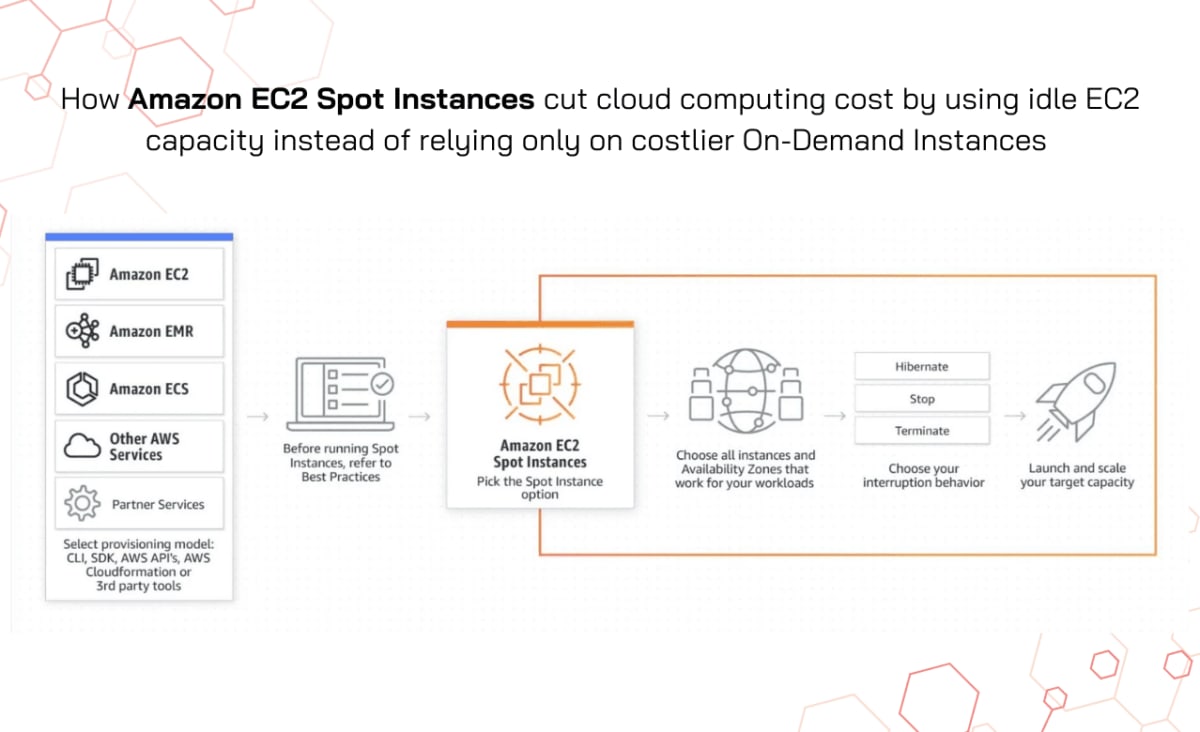
IaaS solutions are ideal for compute-intensive applications, such as scientific simulations or data analytics. Organizations can leverage scalable resources to run complex calculations without investing in physical hardware. Indeed, AWS EC2 Spot Instances allow businesses to run compute-intensive applications like scientific simulations or large-scale data analysis at a fraction of the cost. Spot instances provide flexible, on-demand compute power, which can be ideal for high-performance computing workloads requiring massive parallel processing.
Source: A Spot Instance
- Development and Testing Environments
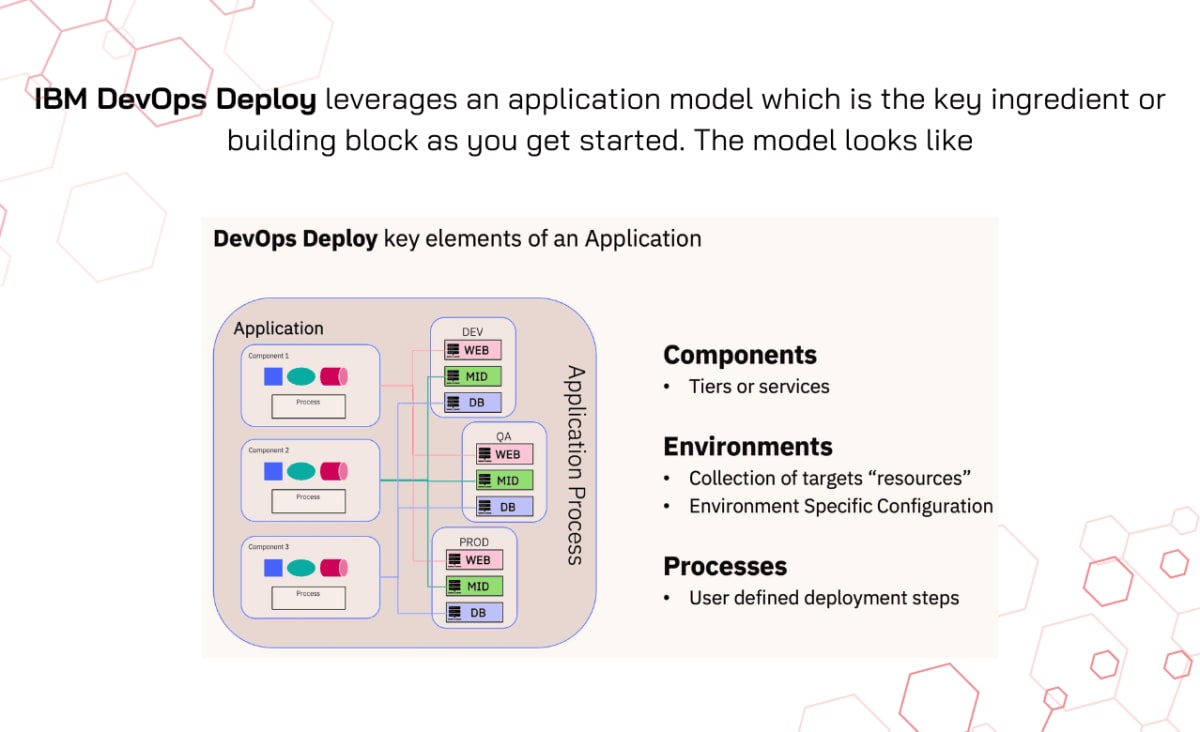
IaaS provides isolated environments for developers to test applications without impacting production systems. IBM Cloud DevOps Services offering provides an isolated environment where developers can test their applications, including continuous integration and continuous deployment (CI/CD) pipelines. The ability to scale environments on-demand helps improve productivity by reducing the overhead of managing physical infrastructure.
Source: Getting Started with IBM DevOps Deploy: Creating your First Application
Hosting websites and web applications becomes hassle-free with IaaS. AWS EC2 allows businesses to quickly deploy and scale web servers for hosting websites and web applications. With the ability to choose from various instance types, companies can easily manage resources based on traffic spikes and web application demands.
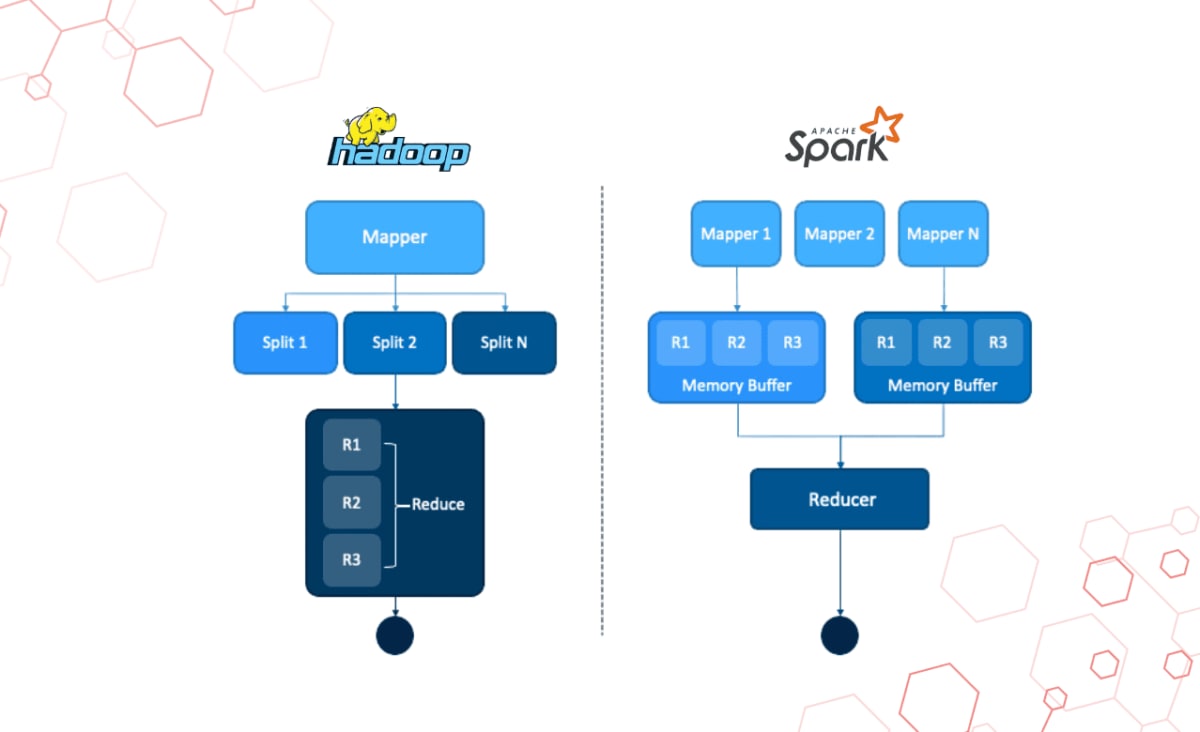
Handling large volumes of data for analytics or processing requires substantial computing power. For example, IBM Cloud Infrastructure offers IaaS for big data applications, providing on-demand computing resources for data processing and analytics. Organizations can use it to run distributed data processing frameworks like Hadoop or Spark, efficiently managing large datasets without investing in on-premise hardware.
Source: Apache Spark vs Hadoop MapReduce – Feature Wise Comparison
- Content Delivery Networks (CDNs)
CDNs use IaaS to distribute content like images and videos to users globally. Amazon CloudFront is a CDN service that distributes static and dynamic content, such as images and videos, across global edge locations. By utilizing IaaS, it reduces latency and ensures faster delivery of content to users worldwide.
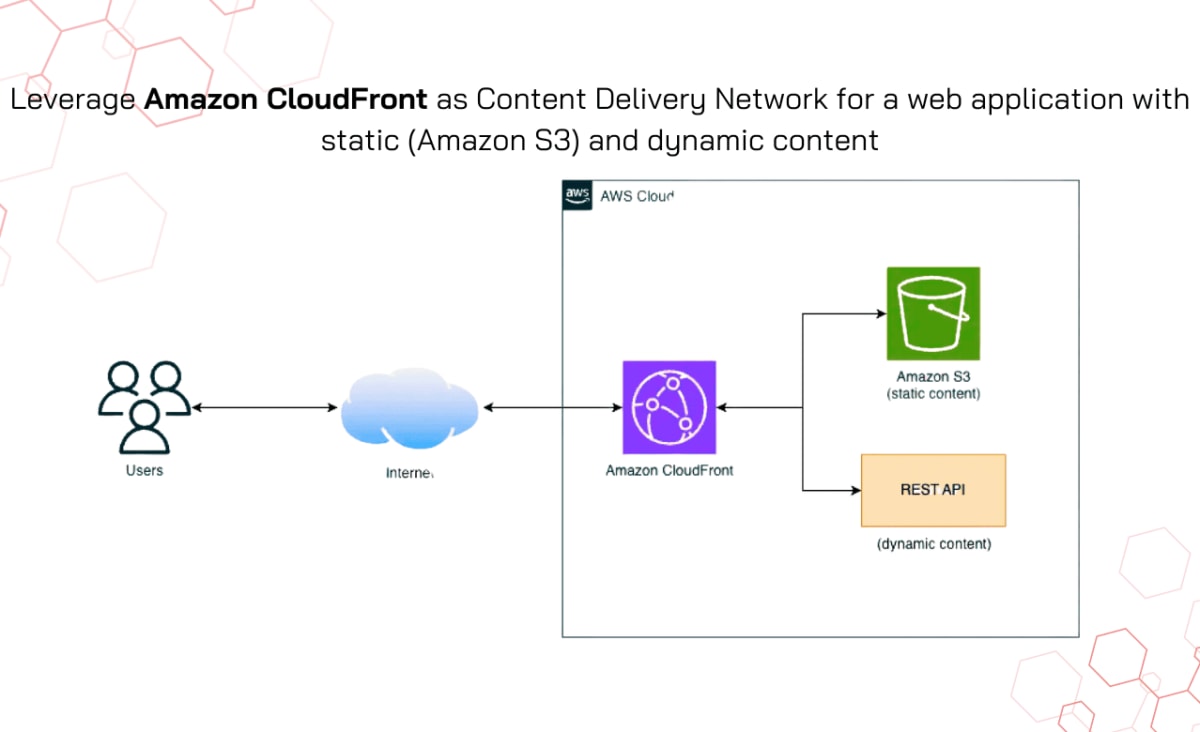
Source: Deploy an Amazon CloudFront distribution for a web application with static and dynamic content
Pricing Model
IaaS typically follows a pay-as-you-go model based on resource allocation, including VMs, storage, and bandwidth.
Example Providers
- Amazon Web Services (AWS)
Offers $0.007 for the first year, with VM instances starting at about $0.0116 per hour for the t2.micro instance. Costs increase based on instance type, storage, and data transfer (e.g., $0.09 per GB for data transfer for most US Regions).
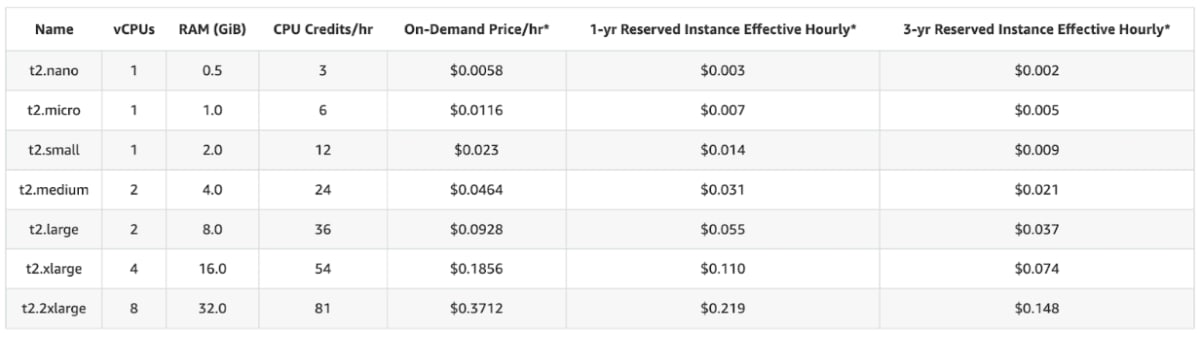
Source: Amazon EC2 T2 Instances
Azure provides a free tier for a limited time, with VM pricing starting at approximately $0.0336 per hour for B2pls v2, plus charges for storage and data transfer.
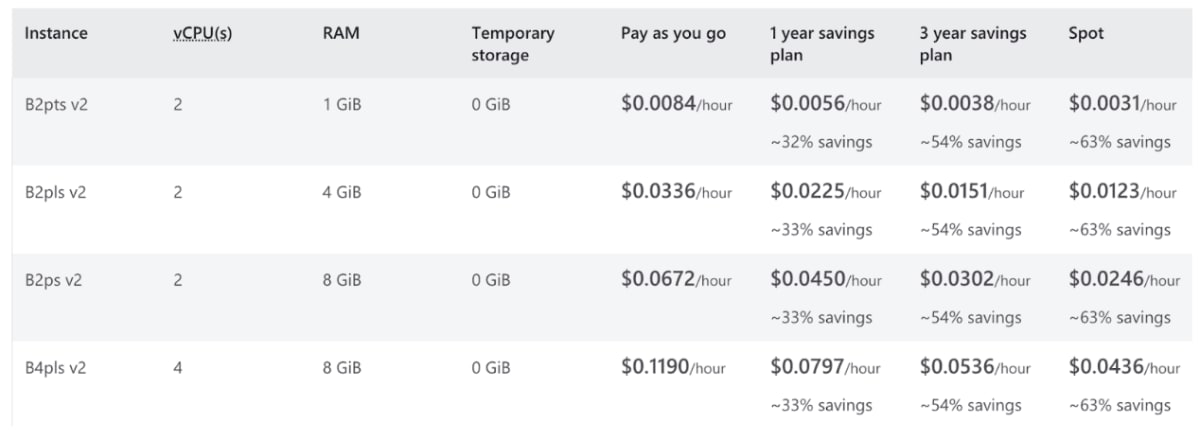
Source: Linux VMs pricing by hour
Conclusion
Traditional infrastructure management is no longer the answer to the evolving demands of modern business. IaaS allows companies to bypass the complexities of physical hardware and gain access to dynamic, scalable resources that grow with their needs. Why tie your business down to expensive and rigid infrastructure when you can leverage the cloud for cost-effective, high-performance solutions?
IaaS isn't just about keeping up—it's about gaining a competitive edge. From streamlining web hosting to enabling seamless data backups and driving real-time analytics, IaaS provides the agility businesses need to stay ahead of the curve. The real question is: Can you afford to fall behind by clinging to outdated methods?
How INNOMIZE Can Help
At INNOMIZE, we specialize in helping businesses harness the full power of IaaS, customizing solutions that fit your unique needs. Our team is dedicated to guiding you through the intricacies of cloud infrastructure, ensuring your transition is seamless and your future-proof strategy is set in motion.
Let’s move beyond limitations—contact INNOMIZE today and start building the future of your business, powered by the cloud.