In an era characterized by rapid technological evolution, businesses face the constant challenge of adapting to technological advancements while striving for operational efficiency and cost-effectiveness. Cloud computing has emerged as a transformative force, reshaping how organizations manage their IT resources and deploy applications. The ability to access computing resources and services over the internet has revolutionized traditional business models, offering unparalleled flexibility, scalability, and innovation.
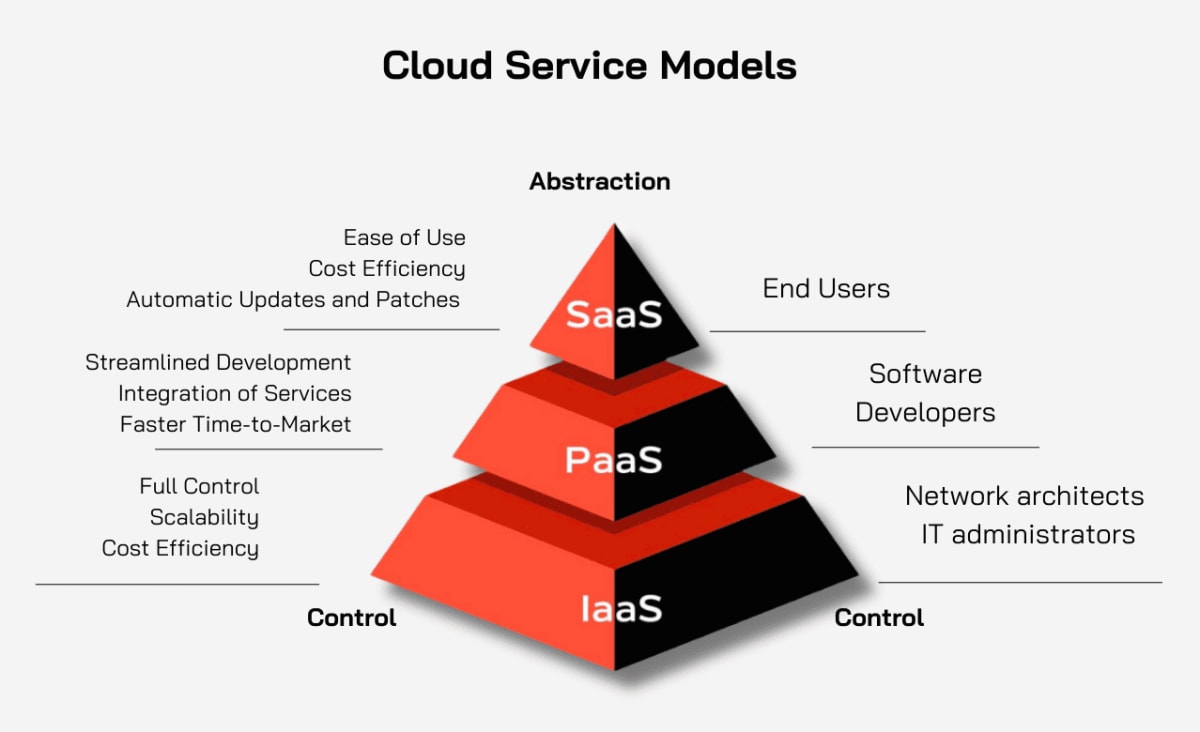
Among cloud service models, three stand out—Software as a Service (SaaS), Platform as a Service (PaaS), and Infrastructure as a Service (IaaS). Each caters to unique requirements, from ready-to-use applications to full-scale infrastructure customization. This article will break down these models, highlight their benefits, and help you determine which is best for your business.
What are SaaS, PaaS, and IaaS?
The key to choosing the right cloud model for your business is understanding what each one offers. Each model comes with its own set of benefits and trade-offs, designed to address different business needs. Let’s take a closer look.
SaaS (Software as a Service)
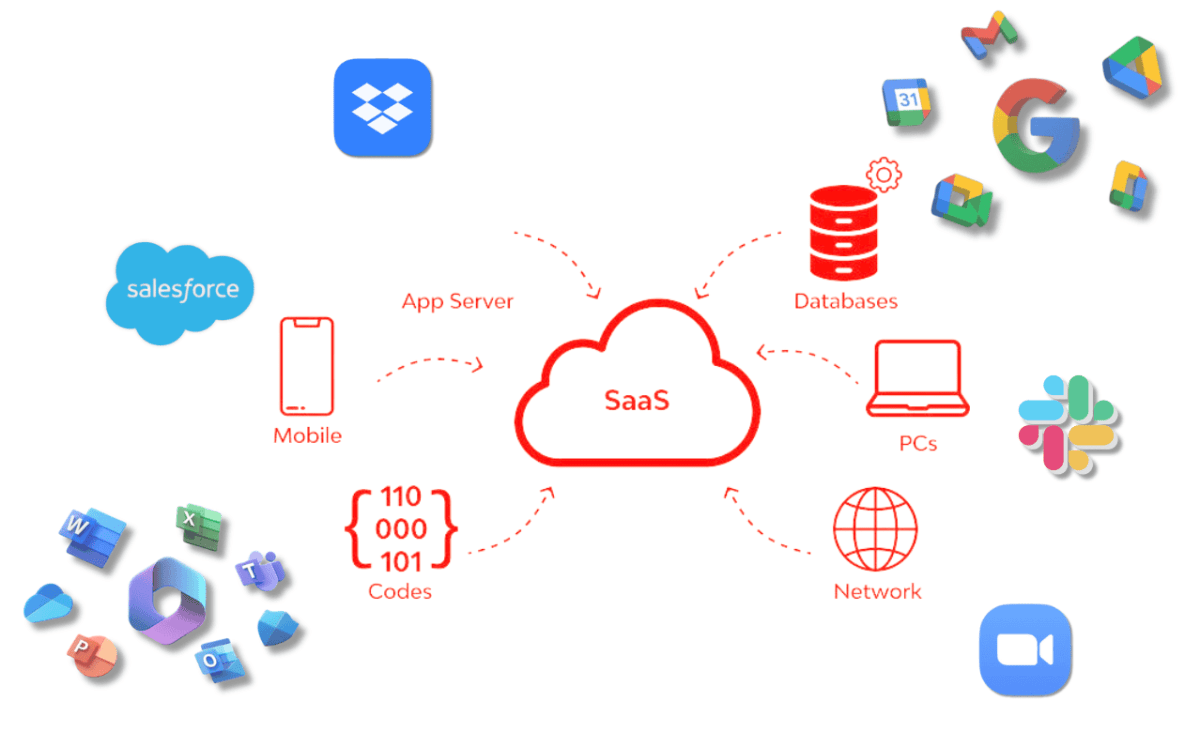
SaaS is the most common and user-friendly cloud model, offering fully managed software applications that are available online. Instead of investing in and maintaining software, businesses can simply use it through a web browser. SaaS eliminates the need for internal IT teams to install, update, and maintain software, making it an ideal solution for companies that need access to ready-made, easy-to-use applications.
Key Benefits of SaaS:
-
Ease of Use: SaaS applications are typically plug-and-play, requiring minimal setup. Users can access the software directly through a browser or mobile app.
-
Cost Efficiency: With SaaS, businesses don’t need to spend money on software development, installation, or ongoing maintenance. Subscription-based pricing models mean you pay only for what you use.
-
Automatic Updates and Patches: SaaS providers handle software updates, ensuring that you always have access to the latest features and security patches.
Popular SaaS Examples: Google Workspace, Microsoft 365, Salesforce, Dropbox, Slack, Zoom.
SaaS is an excellent choice for businesses that need collaborative tools, CRM systems, or project management software without the complexity of backend management.
For more in-depth insights into SaaS, check out our detailed article on What is SaaS? How Does it Benefit Your Business?.
PaaS (Platform as a Service)
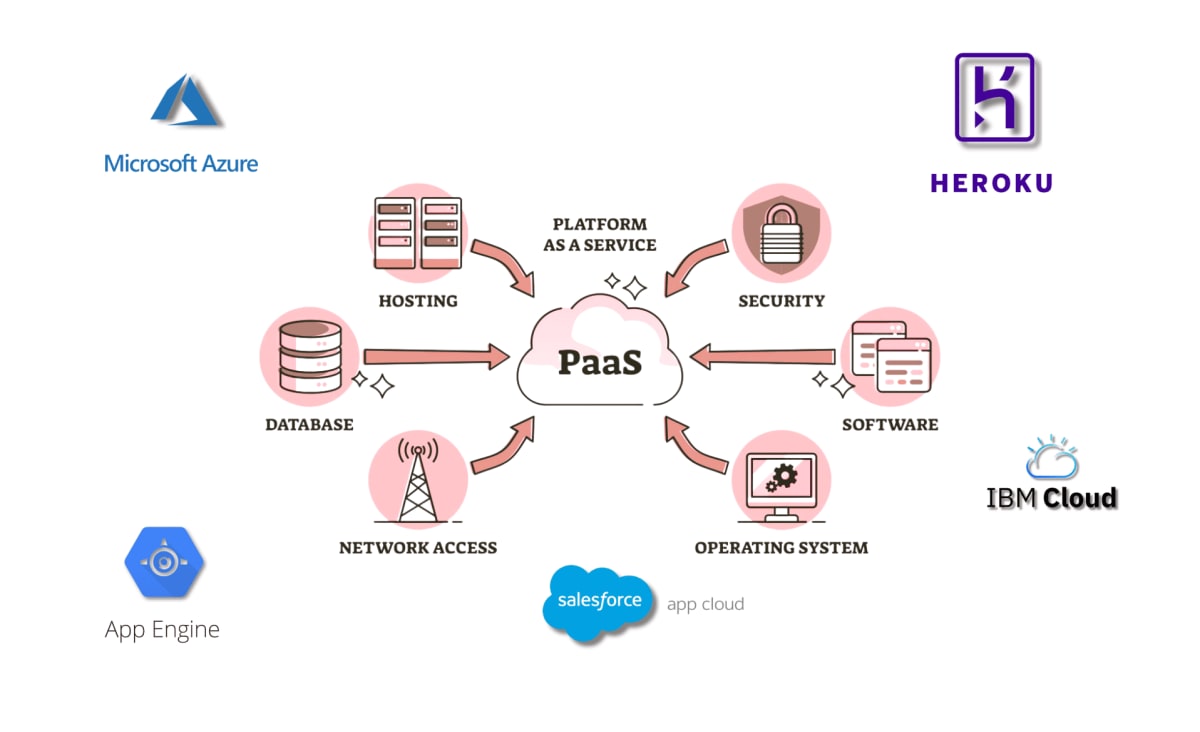
PaaS provides a cloud environment specifically designed for developers to build, test, and deploy custom applications. It eliminates the need for businesses to worry about managing the underlying infrastructure, which includes servers, storage, and networking. PaaS allows developers to focus on writing code while the service provider takes care of the platform.
Key Benefits of PaaS:
-
Streamlined Development: PaaS provides pre-configured tools, frameworks, and services that simplify application development, testing, and deployment.
-
Integration of Services: With PaaS, businesses can integrate a wide variety of services like databases, security, and messaging without building them from scratch.
-
Faster Time-to-Market: By offering built-in application management and scalability, PaaS accelerates the development lifecycle.
Popular PaaS Examples: Microsoft Azure, Google App Engine, Heroku, Salesforce App Cloud, IBM Cloud.
PaaS is perfect for businesses focused on custom app development, microservices, or web application hosting, especially when they want to focus on innovation without managing the infrastructure.
For more in-depth insights into PaaS, check out our detailed article on Platform as a Service: Everything You Need to Know.
IaaS (Infrastructure as a Service)
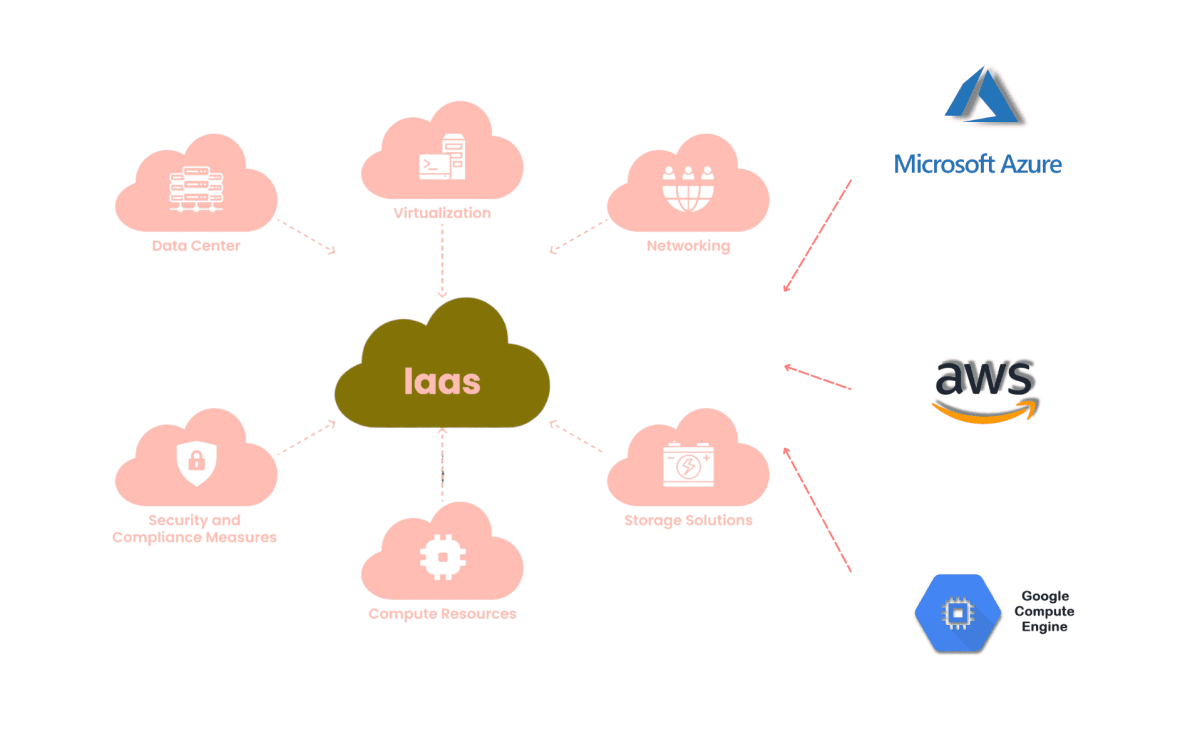
IaaS is the most flexible and scalable cloud model, providing businesses with virtualized computing resources like virtual machines, storage, and networks. Unlike SaaS and PaaS, IaaS gives businesses more control over their infrastructure, allowing them to configure and scale resources based on their specific needs.
Key Benefits of IaaS:
-
Full Control: With IaaS, businesses have complete control over their operating systems, storage, and applications, making it ideal for companies with specific technical requirements.
-
Scalability: As your business grows, IaaS enables you to quickly scale resources up or down based on demand, without worrying about hardware limitations.
-
Cost Efficiency: Since IaaS is based on a pay-as-you-go model, businesses only pay for the resources they actually use, reducing the cost of underutilized infrastructure.
Popular IaaS Examples: Amazon Web Services (AWS), Google Compute Engine, Microsoft Azure.
IaaS is best suited for businesses needing a highly customizable infrastructure for big data analytics, web hosting, or enterprise-level applications that require extensive computing power.
For more in-depth insights into IaaS, check out our detailed article on How IaaS is Shaping the Future of IT Infrastructure.
Which Cloud Model Fits Your Business Needs?
Now that we’ve covered the basics of each cloud model, how do you determine which one is the best fit for your business?
SaaS: Best for Businesses Seeking Ready-Made Solutions
Ask yourself: Do we need ready-to-use software with minimal setup for day-to-day operations?
If you need software that’s ready to use with minimal hassle, SaaS is likely the ideal solution. SaaS is great for businesses that need productivity tools, email services, or customer relationship management (CRM) software without managing servers or software maintenance.
Example Use Cases:
PaaS: Best for Developers Focused on Custom Applications
Ask yourself: Are we focused on developing custom applications without managing infrastructure?
If your business focuses on building, deploying, and managing custom applications, PaaS offers a robust platform for development without the complexity of maintaining the underlying infrastructure. PaaS is ideal for organizations looking to reduce development time and cost.
Example Use Cases:
IaaS: Best for Businesses Requiring Full Control and Scalability
Ask yourself: Do we require full control over our IT environment to run resource-heavy applications?
If you need full control over your IT infrastructure or want to run resource-intensive applications, IaaS indeed provides the flexibility to design and manage a custom infrastructure. It’s ideal for businesses with variable or high-demand workloads that need scalable computing power.
Example Use Cases:
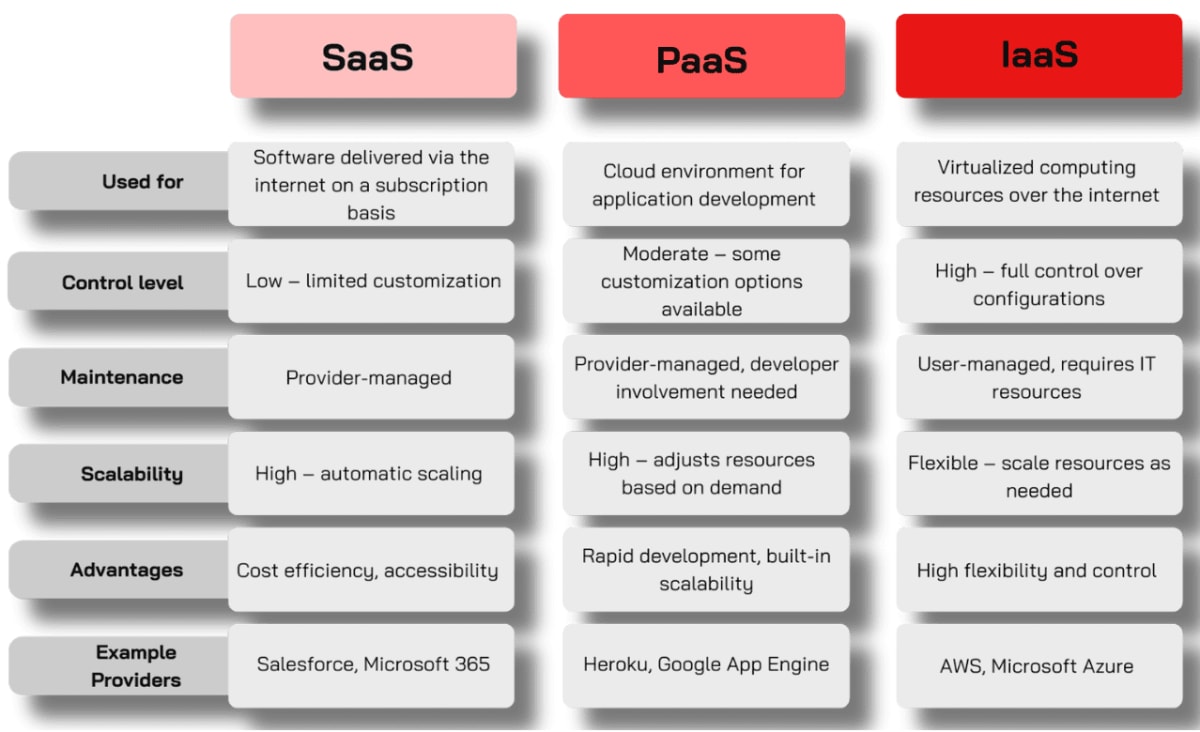
Comparison Table: SaaS vs. PaaS vs. IaaS
Conclusion: Choosing the Right Cloud Model
Navigating the world of cloud computing can be challenging, especially with the diverse options available. Each cloud service model—SaaS, PaaS, and IaaS—is designed to meet specific business needs and presents unique opportunities for operational efficiency and scalability.
-
SaaS: Ideal for businesses that need ready-to-use, low-maintenance applications, making it perfect for enhancing productivity with minimal technical overhead.
-
PaaS: Tailored for organizations focused on rapidly building and deploying custom applications without the complexity of managing infrastructure.
-
IaaS: Best suited for companies seeking full control and scalability, especially for complex workloads and resource-intensive projects.
To choose the right model, businesses must evaluate their current requirements, technical capabilities, and long-term goals. A well-informed decision ensures better productivity, enhanced innovation, and sustainable growth in a competitive market.
How INNOMIZE Can Help
At INNOMIZE, we specialize in helping businesses unlock the potential of cloud computing with tailored solutions designed to fit their unique needs. With over five years of experience, our expertise spans cloud-native applications, serverless technologies, and digital transformation strategies.
Whether you’re looking to simplify IT management, scale efficiently, or future-proof your operations, we’re here to guide you. Our commitment to excellence ensures solutions that go beyond addressing immediate challenges to deliver long-term business value.
Your Cloud Journey Starts Here
Ready to transform your business? Contact us today and let’s craft a solution that empowers your organization to thrive in an ever-evolving digital landscape. Together, we’ll ensure your cloud strategy is as dynamic as your vision for the future.