Building a SaaS product is an investment, but estimating development costs isn’t always straightforward. While many businesses set aside budgets for core areas like coding and UI/UX, hidden expenses often emerge—ranging from compliance requirements and third-party integrations to ongoing maintenance and unexpected infrastructure upgrades.
How do you ensure your budget aligns with your product goals? What factors push costs beyond initial estimates? And most importantly, how can you prevent financial setbacks while still delivering a high-quality, scalable solution?
This article breaks down the key cost drivers in SaaS development, helping you anticipate expenses, optimize investments, and avoid budget overruns.
I. Key Factors That Influence SaaS Development Costs
1. Project Scope and Complexity
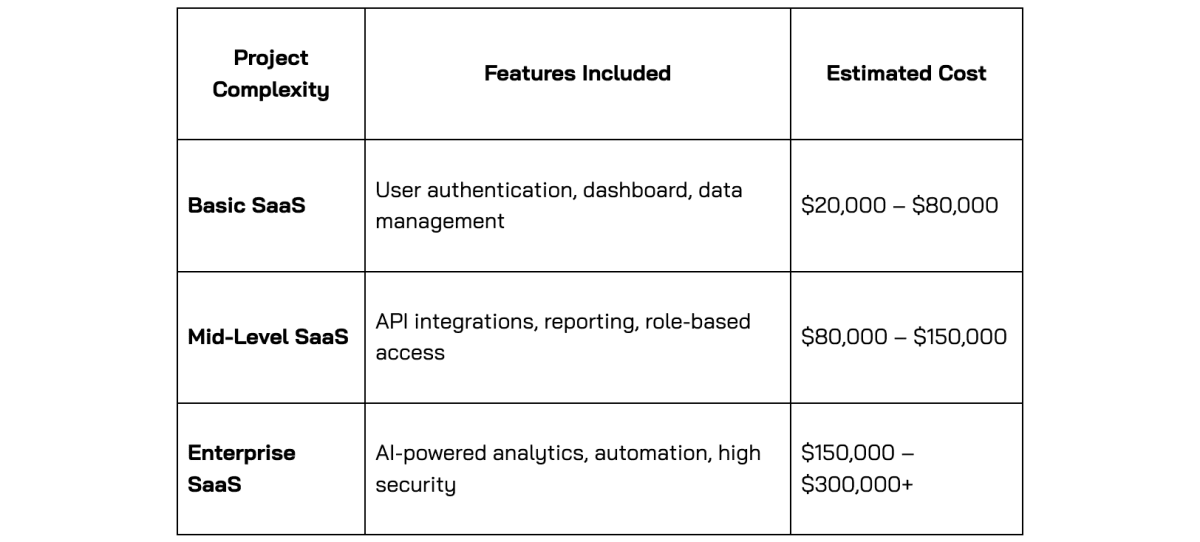
The scope and complexity of your SaaS product play a major role in determining development costs. A simple SaaS application with basic features requires significantly less time and investment compared to an enterprise-level solution with advanced capabilities.
Basic vs. Advanced SaaS Applications
-
Basic SaaS Applications – These typically include user authentication (login/logout), a dashboard, and basic data management. Because they involve standard functionalities and require fewer development hours, they are more cost-effective.
-
Advanced SaaS Applications – These feature AI-powered analytics, real-time data processing, third-party integrations, and role-based access control. Implementing these requires a more complex infrastructure, specialized expertise, and extended development time, leading to higher costs.
Cost Impact Example
A startup-focused CRM SaaS with basic contact management, task tracking, and email integration is relatively affordable to develop.
On the other hand, an AI-driven financial analytics platform that processes large-scale transactions in real time, detects fraud, and provides predictive insights requires advanced technology and more development hours, significantly increasing costs.
2. UI/UX Design: Impact on SaaS Development Costs
A well-designed SaaS product goes beyond aesthetics—it improves usability, enhances engagement, and reduces churn. However, achieving a seamless user experience requires careful planning, iteration, and expertise, all of which contribute to development costs.
Key Cost Factors in UI/UX Design
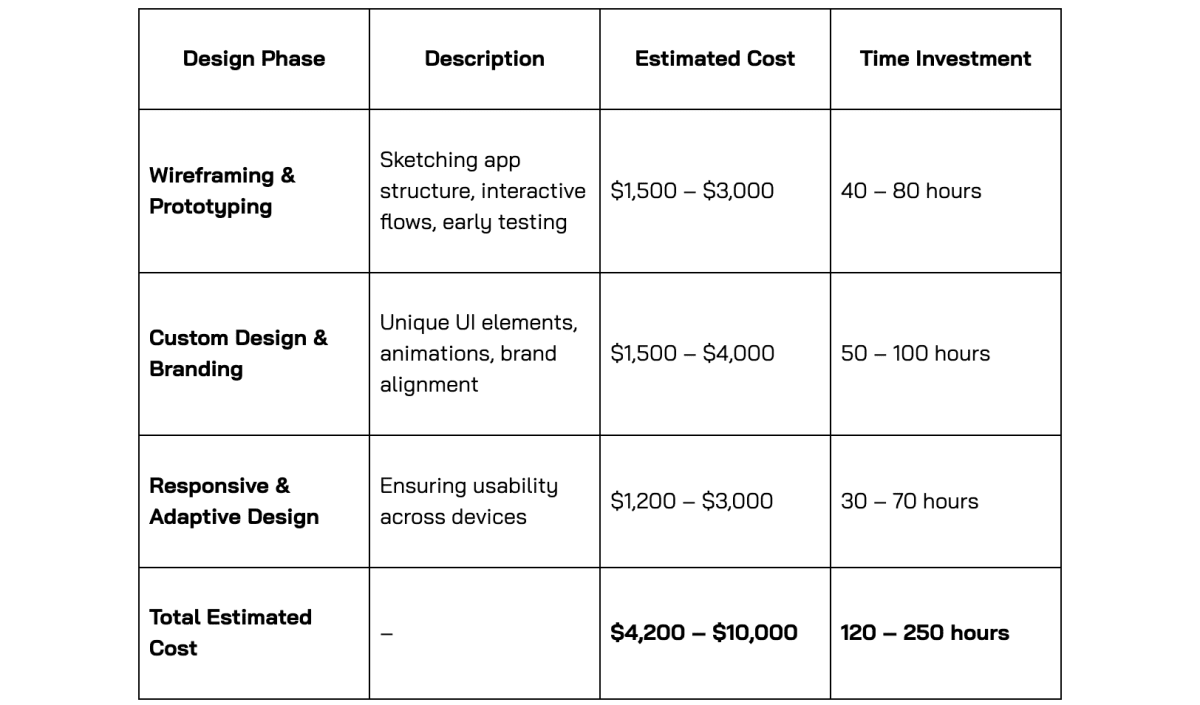
- Wireframing & Prototyping
Before development starts, wireframes and interactive prototypes help visualize the user journey and identify potential usability issues. Early-stage testing and feedback reduce costly revisions later in development.
A unique and tailored UI/UX that aligns with your brand identity ensures differentiation in the market. Custom animations, visual elements, and design consistency require additional design resources.
- Responsive & Adaptive Design
Modern SaaS applications must work seamlessly across multiple devices (desktop, tablet, mobile). Designing and testing for various screen sizes increases design complexity and development time but ensures a better user experience.
Estimated Cost & Time Investment
The cost of UI/UX design depends on the level of customization and complexity.
Why UI/UX Design Matters?
- A well-structured design reduces development rework and unexpected costs.
- Intuitive navigation and responsiveness improve user retention and engagement.
- A professional design builds trust and credibility, influencing customer conversion rates.
While UI/UX costs may seem like an upfront expense, they lead to long-term savings by enhancing user satisfaction and minimizing redesign efforts after launch.
3. Backend & Frontend Development: Building the Core of Your SaaS
Developing a SaaS application requires two essential components: backend (server-side logic, databases, and APIs) and frontend (user interface and interactions). The complexity of each significantly impacts development time and costs.
Backend Development: The Engine Behind Your SaaS
The backend is responsible for managing data, ensuring security, and enabling system performance. Its complexity depends on scalability needs, security compliance, and third-party integrations.
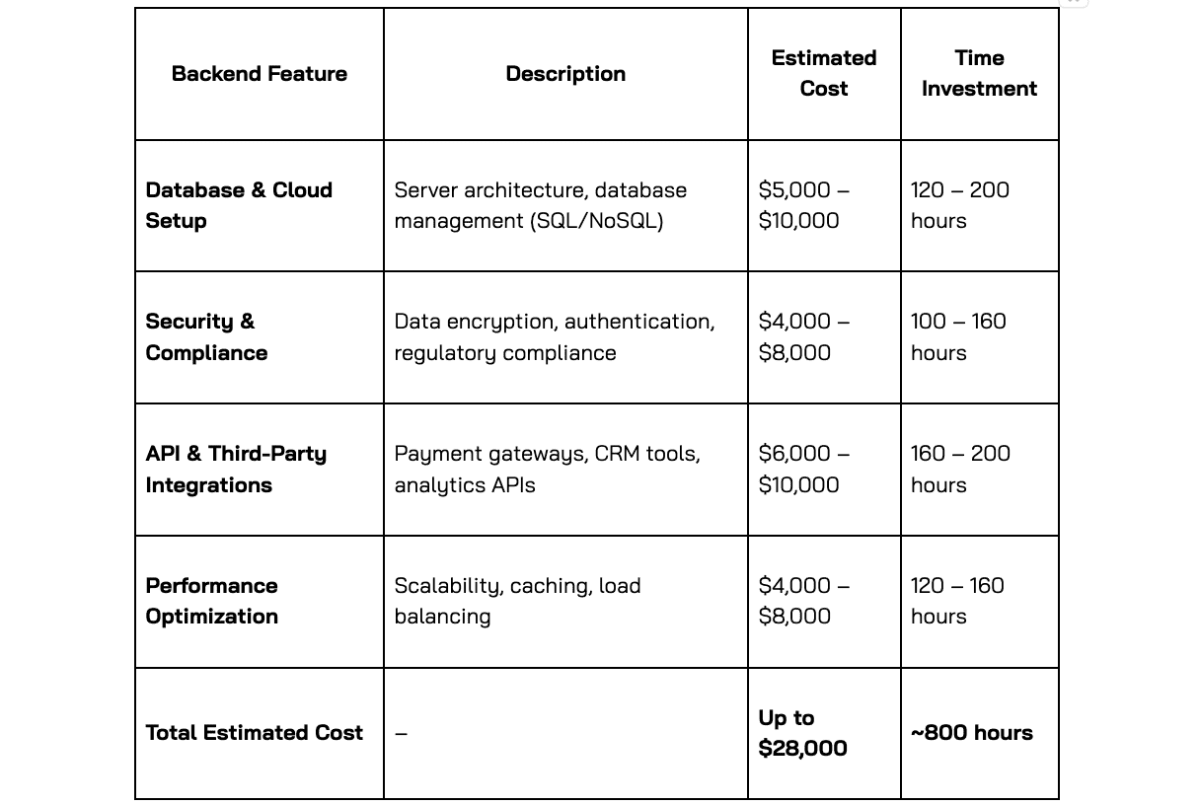
Key Cost Factors in Backend Development
If your SaaS product is expected to handle thousands of users, the system must be built with performance optimization, load balancing, and efficient data processing, increasing development costs.
Implementing data encryption, user authentication, and compliance with regulations like GDPR, HIPAA, or SOC 2 ensures data protection. However, these security protocols require extra development effort.
Payment gateways (Stripe, PayPal), CRM tools (Salesforce, HubSpot), and analytics platforms (Google Analytics, Mixpanel) require API integrations, increasing development complexity.
Estimated Cost & Time Investment
Backend development time and cost vary based on functionality, security requirements, and integrations.
Frontend Development: Bringing the User Interface to Life
The frontend is what users interact with—every button, page, and animation. Its development cost depends on design complexity, responsiveness, and interactive elements.
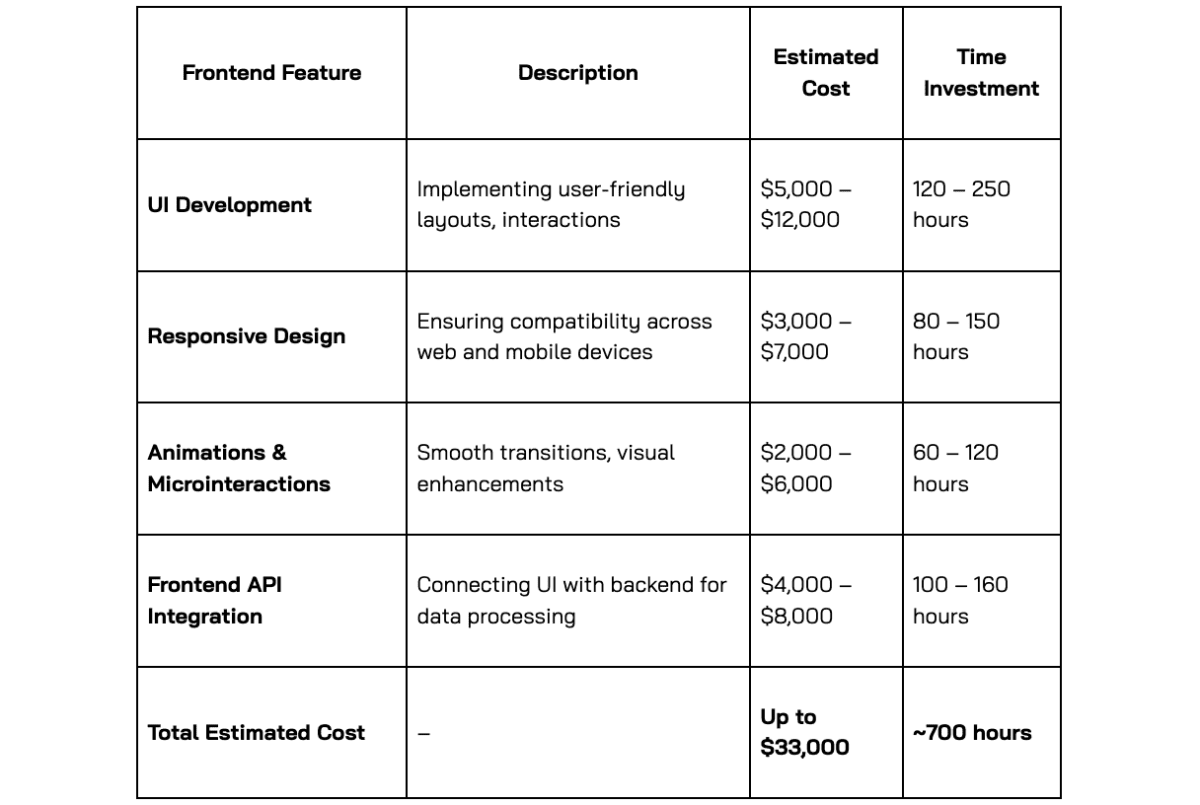
Key Cost Factors in Frontend Development
- User Interface (UI) Development
A well-crafted, intuitive UI ensures a seamless user experience. Complex designs with animations and custom components require additional development time.
- Responsiveness & Cross-Platform Compatibility
The application must work flawlessly across web browsers, mobile devices, and tablets. Ensuring cross-platform compatibility requires extensive testing and optimization.
- Frontend Frameworks & Technologies
Using modern frameworks like React, Angular, or Vue.js improves performance but also affects development costs depending on the chosen stack.
Estimated Cost & Time Investment
Why Backend & Frontend Development Matter?
- A robust backend ensures scalability, security, and smooth data processing.
- A polished frontend enhances user engagement and usability, influencing retention rates.
- Investing in both leads to a seamless, high-performance SaaS product, reducing long-term maintenance costs.
Backend and frontend development together can cost $50,000+, depending on project complexity, but they are crucial investments for a functional and scalable SaaS solution.
4. Quality Assurance & Testing: Ensuring a Reliable SaaS Product
Quality Assurance (QA) and testing are critical to delivering a stable, high-performing SaaS product. Skipping or minimizing this phase can lead to significant post-launch issues, increasing maintenance costs and damaging user trust.
Testing ensures the application functions correctly across different devices, browsers, and network conditions, reducing the risk of bugs, performance issues, and security vulnerabilities.
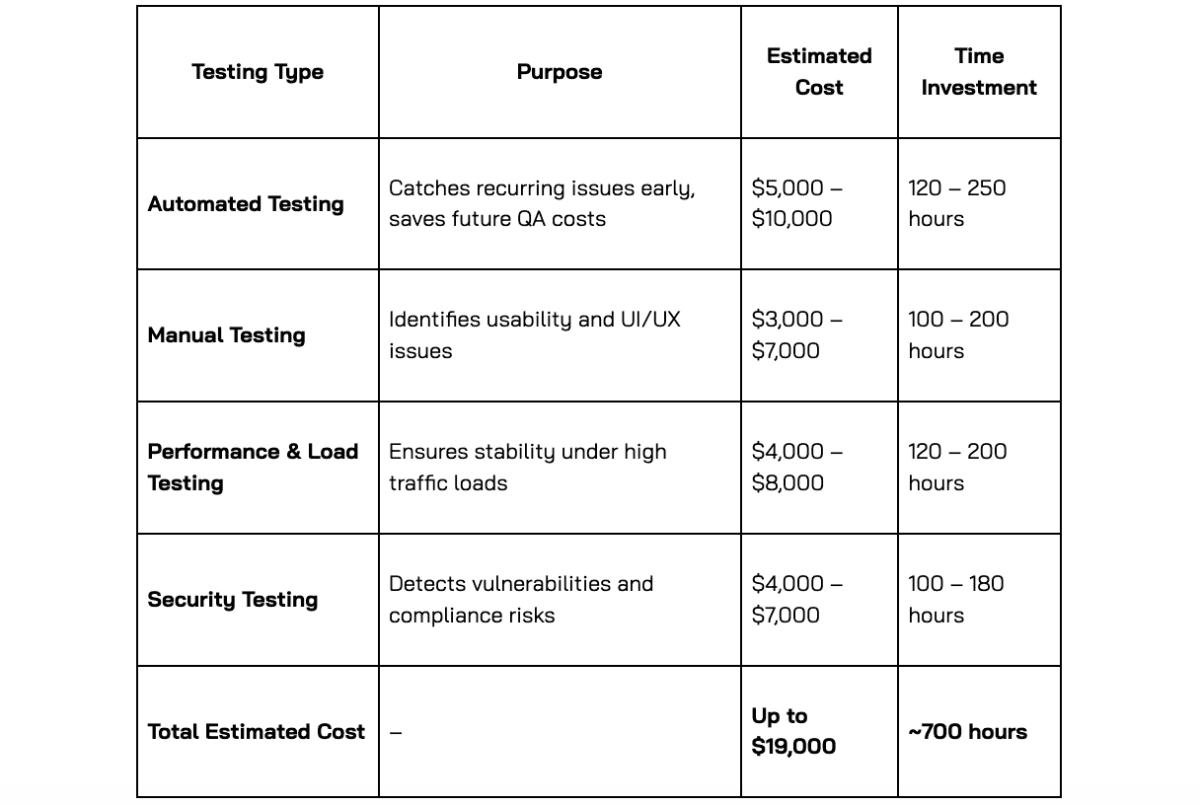
Key Testing Types & Their Impact on Cost
- Automated Testing
Uses scripts to test functionality, catching recurring issues quickly.
Ideal for regression testing (ensuring new updates don’t break existing features).
Saves time in the long run but requires upfront investment in test automation frameworks.
- Manual Testing
Conducted by QA engineers to identify UI/UX issues that automated tests might miss.
Focuses on usability, user flows, and edge cases.
More labor-intensive but necessary for real-world user interactions.
- Performance & Load Testing
Simulates high user traffic to ensure the system can handle expected workloads.
Helps prevent crashes, slow load times, and server failures under peak usage.
Essential for enterprise-level SaaS solutions with large-scale users.
- Security Testing
Identifies vulnerabilities like data leaks, authentication flaws, and hacking risks.
Crucial for SaaS platforms handling sensitive user data or financial transactions.
Estimated Cost & Time Investment
Why Investing in QA & Testing Matters?
- Reduces Post-Launch Fixes: Catching issues before launch minimizes costly rework.
- Enhances User Experience: A bug-free, responsive product improves customer retention.
- Prevents Security Risks: Detecting vulnerabilities early protects user data and ensures compliance.
- Improves System Stability: Load testing prevents downtime and crashes under peak usage.
A strong QA process ensures your SaaS product is reliable, scalable, and secure, preventing failures that could damage your reputation and increase long-term costs.
5. Deployment & Ongoing Maintenance: Sustaining Your SaaS Product
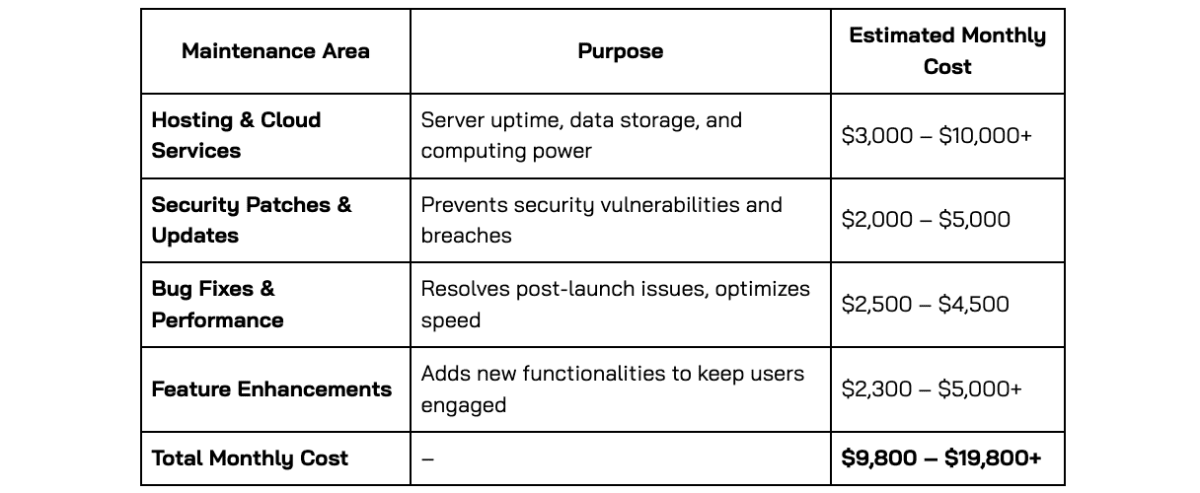
Launching a SaaS product is just the beginning—ongoing maintenance is essential to ensure long-term stability, security, and scalability. Without regular updates, performance optimizations, and security patches, your SaaS platform could face downtime, security risks, and poor user experience, ultimately leading to customer churn.
Key Areas of Ongoing Maintenance
- Hosting & Cloud Services
- SaaS platforms rely on cloud infrastructure (AWS, Google Cloud, Azure) to store data, handle user traffic, and ensure uptime.
- Costs vary based on server load, data storage, and computing power needed to support active users.
For example, a startup SaaS with 1,000 users may need minimal cloud resources, while an enterprise SaaS handling real-time analytics requires a robust, scalable infrastructure.
- Security Patches & System Updates
- Regular security updates protect against vulnerabilities, cyber threats, and data breaches.
- Compliance with regulations like GDPR, HIPAA, or SOC 2 requires continuous monitoring and updates.
- Neglecting security patches can lead to data leaks, legal penalties, and loss of customer trust.
- Bug Fixes & Performance Optimization*
- Post-launch bugs are inevitable. Quick fixes and optimizations ensure a seamless user experience.
- Performance tuning helps reduce load times, optimize database queries, and handle high traffic efficiently.
- Feature Enhancements & Scaling
- To stay competitive, SaaS companies need to continuously add new features based on user feedback.
- Scaling the platform as user demand grows may require additional infrastructure investments.
For example: A SaaS CRM platform might need AI-driven analytics or automation tools to stay ahead of competitors.
Estimated Ongoing Costs
Why Ongoing Maintenance is Crucial?
- Prevents System Downtime: Ensures high uptime and reliability for users.
- Improves Security & Compliance: Protects user data from breaches and meets industry regulations.
- Enhances User Satisfaction: Regular updates improve usability and performance.
- Supports Business Growth: Scaling ensures the platform can handle more users and new features.
Investing in maintenance reduces long-term risks and keeps your SaaS product competitive, ensuring it continues to meet user needs while remaining secure and efficient.
II. SaaS Development Cost Estimates
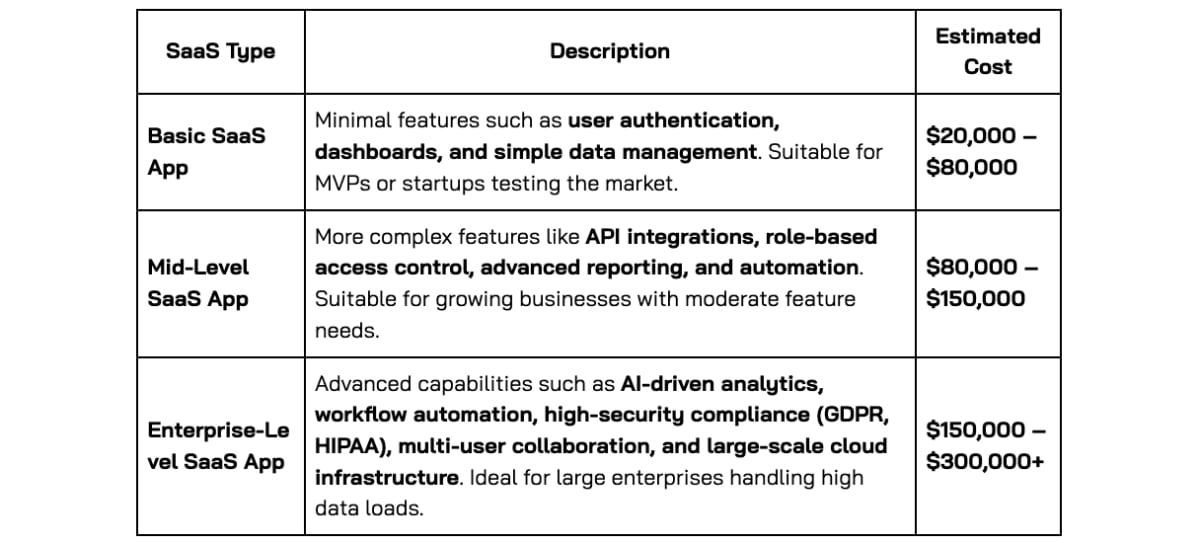
The cost of developing a SaaS product varies significantly based on feature complexity, required integrations, security needs, and scalability. Below is a general cost breakdown based on the level of complexity:
Breakdown of SaaS Development Costs
III. Choosing the Right Development Team
The team you choose for SaaS development impacts cost, efficiency, and long-term scalability. Here’s a breakdown of the three main options and their cost implications:
1. In-House Development
Hiring an internal team provides better collaboration and direct communication, but it comes with the highest costs. You'll need to cover salaries, benefits, infrastructure, and ongoing training.
- Best for: Large enterprises with long-term development needs and sufficient budgets.
- Challenges: High salaries ($100,000–$300,000/year per developer), hiring delays, and maintenance overhead.
2. Freelancers
Freelancers offer a flexible and affordable solution, particularly for smaller projects or short-term work. However, managing multiple freelancers can lead to inconsistent quality, security risks, and project delays.
- Best for: Small projects, MVPs, or companies with internal project managers.
- Challenges: Lower accountability, communication difficulties, and a lack of long-term commitment.
- Cost: $15–$80/hour, depending on expertise and region.
3. Outsourcing (The Most Cost-Effective Option)
Outsourcing to a specialized SaaS development company gives access to expert teams at a lower cost than hiring in-house. You get a dedicated team with industry experience while avoiding hiring and infrastructure expenses.
- Best for: Startups and mid-sized businesses looking for high-quality development at a lower cost.
- Challenges: Requires clear communication and well-defined project scope.
- Cost: $20–$80/hour, depending on location and expertise.
Hourly Development Rates by Region
- Asia: $20–$50/hour (cost-effective, skilled talent available).
- Eastern Europe: $30–$80/hour (strong technical expertise at a mid-range cost).
- North America & Western Europe: $50–$150/hour (highest cost, but local availability).
Key Takeaway: Outsourcing saves 40–60% compared to in-house hiring while ensuring quality development.
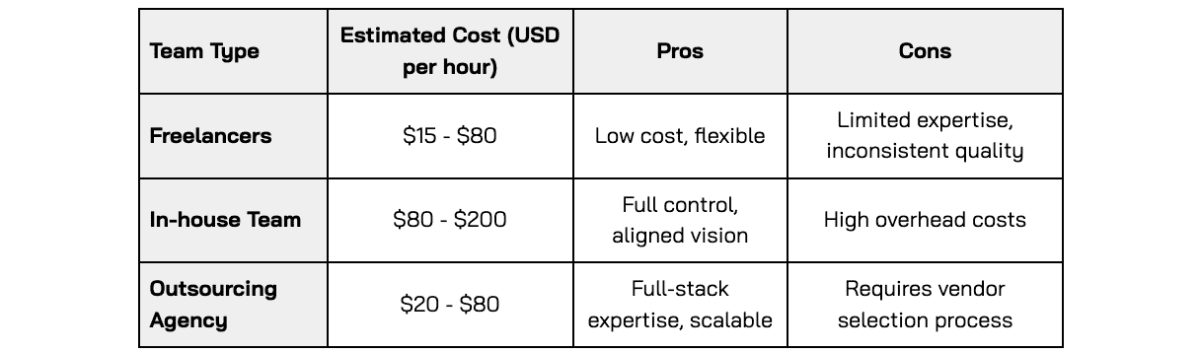
Outsourcing agencies strike the best balance between affordability and quality, particularly for startups and mid-sized businesses.
If you're considering outsourcing but are unsure about the cost, check out our latest blog: What’s the Cost of Building an App in 2025? Here’s the Breakdown.
IV. How to Reduce SaaS Development Costs
Reducing SaaS development costs without compromising quality requires smart planning and resource allocation. Here are some key strategies:
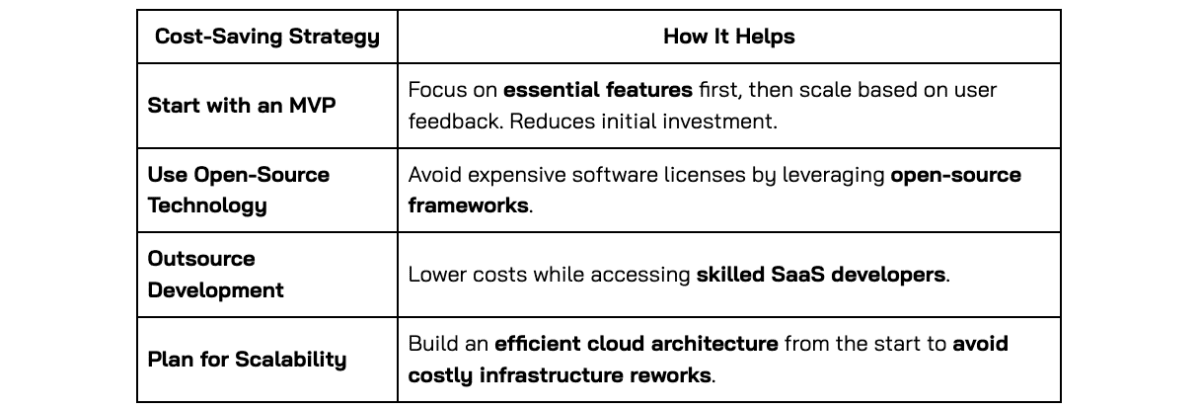
By making strategic choices in development approach and resource allocation, businesses can significantly optimize SaaS development costs while maintaining quality.
VI. Hidden Costs in SaaS Development and How to Avoid Them
When planning a SaaS project, most businesses focus on the main costs like development, UI/UX design, and hosting. However, there are hidden expenses that can add up over time. If not considered early, these costs may impact your budget and profitability.
1. Third-Party Services & Subscription Fees
Many SaaS platforms rely on external tools, APIs, and cloud services. While some offer free tiers, scaling up often means paying for premium plans. Common costs include:
- Payment gateways (e.g., Stripe, PayPal) charge transaction fees.
- Cloud storage & computing (e.g., AWS, Google Cloud) bill based on usage.
- Email & notification services (e.g., SendGrid, Twilio) charge per email or message sent.
- Software licenses for libraries, AI tools, or analytics platforms.
How to avoid: Compare pricing models and estimate long-term costs before committing.
2. Compliance & Security Costs
If your SaaS platform handles sensitive data, you must meet industry regulations. Achieving compliance and maintaining security isn’t free.
- GDPR, HIPAA, or SOC 2 compliance requires audits and legal consultation.
- Security tests & penetration testing help prevent breaches but can be expensive.
- Legal fees for privacy policies, terms of service, and contracts.
How to avoid: Plan for compliance from the start rather than scrambling later.
3. Data Migration & Integrations
Connecting your SaaS product with existing systems or moving customer data from another platform can be costly.
- Custom API development for integrations with enterprise software like Salesforce or SAP.
- Data migration can take longer than expected, increasing costs.
How to avoid: Check the complexity of integrations early and budget for additional development time.
4. Performance & Scalability Costs
As your user base grows, so do your infrastructure needs. Scaling your SaaS product requires:
- Upgrading cloud servers to handle increased traffic.
- Load balancing & caching to improve speed and reliability.
- Unexpected traffic spikes that can increase hosting costs.
How to avoid: Choose a scalable infrastructure and monitor resource usage.
5. Customer Support & Training
Providing ongoing support and training for users requires resources. Costs include:
- Customer support software (e.g., Zendesk, Intercom).
- Hiring support staff or implementing chatbots.
- Creating onboarding materials and help documentation.
How to avoid: Automate support where possible and budget for training materials.
6. Marketing & Customer Acquisition
Even the best SaaS product needs marketing to attract users. Hidden costs include:
- SEO, paid ads, and content marketing.
- Referral programs & promotional offers.
- Affiliate commissions to partners.
How to avoid: Allocate a marketing budget from the start instead of relying on organic growth alone.
7. Ongoing Maintenance & Unexpected Fixes
Launching a SaaS product isn’t the end of the journey—maintenance is an ongoing expense. Costs include:
- Fixing bugs & improving performance.
- Developing new features based on user feedback.
- Monitoring & optimizing system performance.
How to avoid: Set aside a maintenance budget (typically 15-20% of development costs).
VII. Final Thoughts
SaaS development costs depend on various factors, from project complexity to team structure. However, proper planning and the right development approach can help optimize costs while ensuring scalability, security, and long-term success.
Looking for a reliable SaaS development partner? INNOMIZE specializes in building custom SaaS solutions tailored to your business needs. Whether you're developing an MVP or scaling an enterprise platform, our team ensures high-quality development with cost-effective solutions.